
1D0-61B · Question #20
Which code is best for embedding video into an HTML5 page?
The correct answer is A. Option A. Using the <video> element is the semantically correct and native HTML5 approach for embedding video - it requires no plugins, supports multiple source formats via nested <source> tags, and exposes built-in browser controls through the controls attribute. The <embed> tag (a…
Question
Which code is best for embedding video into an HTML5 page?
Exhibit
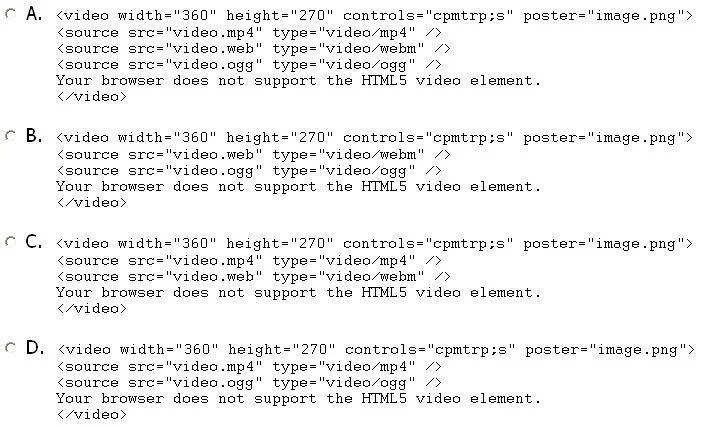
Options
- AOption A
- BOption B
- COption C
- DOption D
How the community answered
(23 responses)- A87% (20)
- B9% (2)
- C4% (1)
Explanation
Using the <video> element is the semantically correct and native HTML5 approach for embedding video - it requires no plugins, supports multiple source formats via nested <source> tags, and exposes built-in browser controls through the controls attribute. The <embed> tag (a common distractor) is a legacy element primarily used for plugin-based content like Flash and lacks the accessibility and control features of <video>. The <object> element is similarly outdated and was designed for embedding external resources generically, not video specifically. An <iframe> approach (another common distractor) is appropriate for embedding third-party hosted video (like YouTube) but is not the standard for self-hosted HTML5 video.
Memory tip: Think "HTML5 = <video>" - the <video> tag arrived with HTML5 as a first-class media citizen, so whenever the question specifies "HTML5 page," the native <video> element is almost always the right answer.
Topics
Community Discussion
No community discussion yet for this question.