
1D0-61B · Question #18
To define a circle-shaped hot-spot for an image map, which of the following code fragments would you use?
The correct answer is D. Option D. Option D correctly uses <area shape="circle" coords="x,y,r" ...>, where shape="circle" is the valid HTML attribute value and coords takes exactly three values: the center x-coordinate, center y-coordinate, and radius. The other options are wrong for typical reasons seen in this…
Question
To define a circle-shaped hot-spot for an image map, which of the following code fragments would you use?
Exhibit
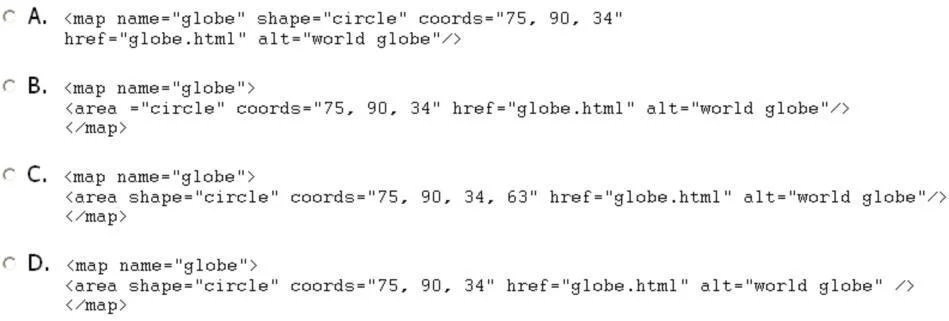
Options
- AOption A
- BOption B
- COption C
- DOption D
How the community answered
(55 responses)- A4% (2)
- B9% (5)
- C16% (9)
- D71% (39)
Explanation
Option D correctly uses <area shape="circle" coords="x,y,r" ...>, where shape="circle" is the valid HTML attribute value and coords takes exactly three values: the center x-coordinate, center y-coordinate, and radius.
The other options are wrong for typical reasons seen in this type of question:
- Option A likely uses an incorrect
shapevalue such as"round"or"circular"- neither is valid HTML; the only accepted values arecircle,rect, andpoly. - Option B likely provides the wrong number of
coordsvalues (e.g., four values like a rectangle, which needsx1,y1,x2,y2). - Option C likely confuses circle syntax with polygon syntax (
shape="poly"requires an arbitrary list of x/y pairs).
Memory tip: Think "circle = center + radius = 3 numbers" - cx, cy, r. If you see four coordinates, that's a rectangle (x1,y1,x2,y2). Matching the coordinate count to the shape is the fastest way to eliminate wrong answers on the exam.
Topics
Community Discussion
No community discussion yet for this question.