
156-215.80 · Question #76
Which application should you use to install a contract file?
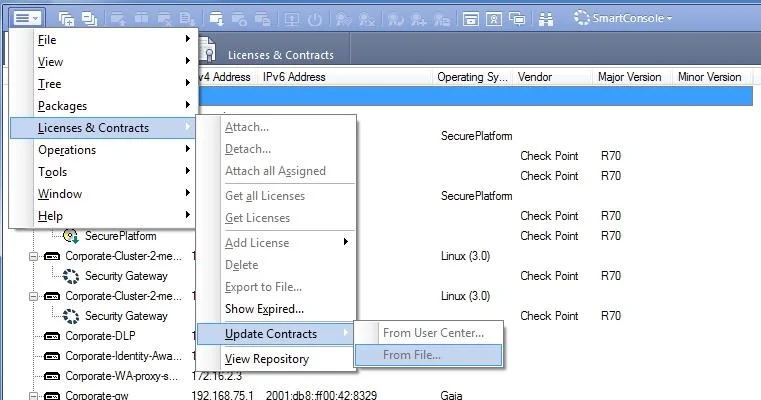
The correct answer is C. SmartUpdate. Using SmartUpdate: If you already use an NGX R65 (or higher) Security Management / Provider- 1 / Multi-Domain Management Server, SmartUpdate allows you to import the service contract file that you have downloaded in Step #3. Open SmartUpdate and from the Launch Menu select…
Question
Which application should you use to install a contract file?
Exhibit
Options
- ASmartView Monitor
- BWebUI
- CSmartUpdate
- DSmartProvisioning
How the community answered
(31 responses)- A6% (2)
- B3% (1)
- C90% (28)
Explanation
Using SmartUpdate: If you already use an NGX R65 (or higher) Security Management / Provider- 1 / Multi-Domain Management Server, SmartUpdate allows you to import the service contract file that you have downloaded in Step #3. Open SmartUpdate and from the Launch Menu select 'Licenses & Contracts' -> 'Update ' -> 'From File...' and provide the path to the file you have downloaded in Step #3: Note: If SmartUpdate is connected to the Internet, you can download the service contract file directly from the UserCenter without going through the download and import steps. https://supportcenter.checkpoint.com/supportcenter/portal?eventSubmit_doGoviewsolutiondetails =&solutionid=sk33089
Topics
Community Discussion
No community discussion yet for this question.