
156-215.80 · Question #206
You want to reset SIC between smberlin and sgosaka. In SmartDashboard, you choose sgosaka, Communication, Reset. On sgosaka, you start cpconfig, choose Secure Internal Communication and enter the…
The correct answer is C. The check Point services on the Gateway were not restarted because you are still in the cpconfig. This question tests understanding of why SIC fails after a reset when cpconfig changes have not been applied by restarting Check Point services.
Question
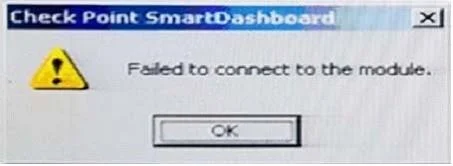
You want to reset SIC between smberlin and sgosaka. In SmartDashboard, you choose sgosaka, Communication, Reset. On sgosaka, you start cpconfig, choose Secure Internal Communication and enter the new SIC Activation Key. The screen reads The SIC was successfully initialized and jumps back to the menu. When trying to establish a connection, instead of a working connection, you receive this error message:
What is the reason for this behavior?
Exhibits
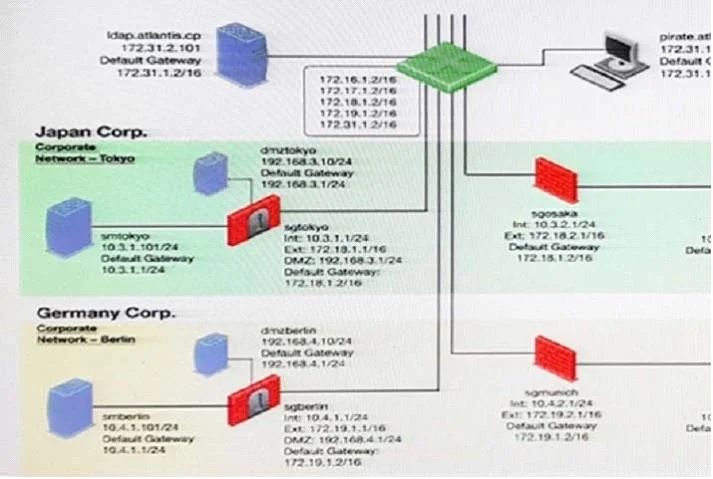
Options
- AThe Gateway was not rebooted, which is necessary to change the SIC key.
- BYou must first initialize the Gateway object in SmartDashboard (i.e., right-click on the object,
- CThe check Point services on the Gateway were not restarted because you are still in the cpconfig
- DThe activation key contains letters that are on different keys on localized keyboards. Therefore,
How the community answered
(26 responses)- A8% (2)
- B15% (4)
- C46% (12)
- D31% (8)
Why each option
This question tests understanding of why SIC fails after a reset when cpconfig changes have not been applied by restarting Check Point services.
A full reboot is not required to apply a SIC key change - restarting Check Point services (cpstop/cpstart) after exiting cpconfig is sufficient.
Right-clicking the gateway object in SmartDashboard is not a required or standard step in the SIC reset procedure; the Communication button on the object properties is the correct mechanism.
When cpconfig is used to set a new SIC activation key, the change is written to configuration but does not take effect in the running Check Point processes until cpconfig is fully exited and the services are restarted. Attempting to establish SIC while still inside the cpconfig session means the gateway's running processes still hold the old SIC state, causing the connection to fail.
The scenario explicitly states the screen confirmed 'SIC was successfully initialized,' indicating the key was accepted and entered correctly, ruling out a keyboard localization mismatch.
Concept tested: SIC reset procedure and service restart requirement
Source: https://supportcenter.checkpoint.com/supportcenter/portal?eventSubmit_doGoviewsolutiondetails=&solutionid=sk65764
Topics
Community Discussion
No community discussion yet for this question.