
101 · Question #89
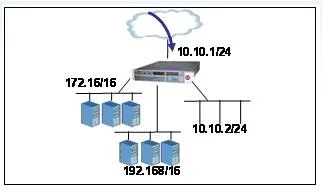
Click the Exhibit Button an LTM has the 3 virtual servers, a SNAT defined, four self IP addresses defined and the networks shown in the exhibit. Selected options for each object are shown below…
The correct answer is B. Source IP: Either 172.16.20.50 or 192.168.10.50; Destination IP: 10.10.2010. When a connection matches an IP Forwarding virtual server with an attached SNAT pool, the source IP is translated to one of the SNAT pool member addresses while the destination remains unchanged.
Question
Click the Exhibit Button an LTM has the 3 virtual servers, a SNAT defined, four self IP addresses defined and the networks shown in the exhibit. Selected options for each object are shown below. Settings not shown are at their defaults. VirtualServer 1 Destination: 10.10.1.102:80 netmask 255.255.255.255 Pool: Pool with 3 members in the 172.16/16 network SNAT Automap enabled VirtualServer2 Destination: 10.10.1.102:* netmask 255.255.255.255 Pool: Pool with 3 members in the 192.168/16 network VirtualServer 3 Destination: 10.10.2.0:80 netmask 255.255.255.0 Type: IP Forwarding SNATI Source IP: All Addresses SNAT Address: SNAT Pool with 2 members 172.16.20.50 and 192.168.10.50 Self IPs 192.168.1.1; 172.16.1.1; 10.10.2.1; 10.10.1.1 A connection attempt is made with a source IP and port of 10.20.100.50:80 and a destination IP and port of 10.10.2.10:80. When the request is processed, what will be the source and destination IP addresses?
Exhibit
Options
- AThe request will be dropped.
- BSource IP: Either 172.16.20.50 or 192.168.10.50; Destination IP: 10.10.2010
- CSource IP: 10.20.100.50; Destination IP: 10.10.2.10
- DSource IP: 10.10.2.1; Destination IP: 10.10.2.10
How the community answered
(23 responses)- A9% (2)
- B70% (16)
- C4% (1)
- D17% (4)
Why each option
When a connection matches an IP Forwarding virtual server with an attached SNAT pool, the source IP is translated to one of the SNAT pool member addresses while the destination remains unchanged.
The packet is not dropped because it matches VirtualServer 3 whose destination network 10.10.2.0/24 covers 10.10.2.10 on port 80.
The connection to 10.10.2.10:80 matches VirtualServer 3 (destination 10.10.2.0/24, port 80, type IP Forwarding). The SNAT pool attached to that virtual server contains two members - 172.16.20.50 and 192.168.10.50 - so the BIG-IP translates the source IP to one of those two addresses, leaving the destination IP as 10.10.2.10 per IP Forwarding behavior.
10.20.100.50 is not a member of the configured SNAT pool; the source IP must be translated to an actual SNAT pool member address.
10.10.2.1 is a self IP address, not a SNAT pool member; self IPs are used for SNAT Automap, which is not configured on VirtualServer 3.
Concept tested: BIG-IP IP Forwarding virtual server with SNAT pool
Source: https://techdocs.f5.com/kb/en-us/products/big-ip_ltm/manuals/product/ltm-concepts-11-4-0/ltm_snat.html
Topics
Community Discussion
No community discussion yet for this question.