
050-696 · Question #77
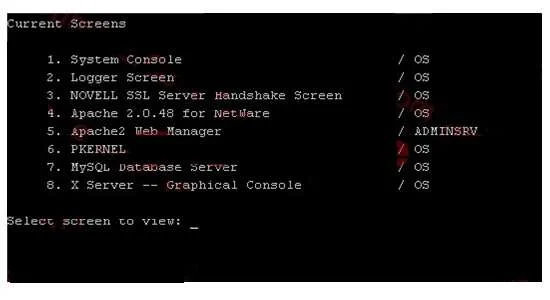
Click the Exhibit button to begin. You need to display a list of current console screens on an OES NetWare server; as shown in the Exhibit. Which keystroke combination will display this list?
The correct answer is B. Ctrl + Esc. On an OES NetWare server console, pressing Ctrl + Esc displays a list of all currently active console screens.
Question
Exhibit
Options
- AAlt + Esc
- BCtrl + Esc
- CCtrl + Alt
- DShift + Esc
- ECtrl + Alt + Esc
- FShift + Ctrl + Alt
How the community answered
(49 responses)- A10% (5)
- B84% (41)
- D2% (1)
- F4% (2)
Why each option
On an OES NetWare server console, pressing Ctrl + Esc displays a list of all currently active console screens.
Alt + Esc cycles through open console screens one at a time rather than displaying a full list of all available screens.
In Novell NetWare, Ctrl + Esc is the keyboard shortcut that opens a pop-up list of all active console screens, allowing the administrator to select and switch between them. This is a fundamental console navigation shortcut built into the NetWare server operating system environment.
Ctrl + Alt alone is not a defined NetWare console shortcut and performs no standard action.
Shift + Esc has no defined function for displaying console screens in the NetWare environment.
Ctrl + Alt + Esc is not the correct combination for this function in NetWare; that three-key combination is not a standard NetWare console shortcut.
Shift + Ctrl + Alt is not a recognized NetWare console keystroke combination for any screen management function.
Concept tested: NetWare server console screen navigation keyboard shortcuts
Topics
Community Discussion
No community discussion yet for this question.