
050-696 · Question #89
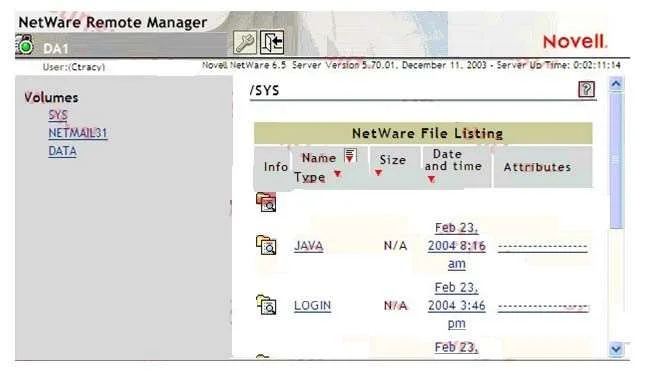
Click the Exhibit button to begin. When you open Remote Manager and authenticate to your DA1 server, only a minimal set of options are displayed; as shown in the exhibit. Why is this happening?
The correct answer is F. You've authenticated as a user who doesn't have the Supervisor right to the DA1 server object. Novell OES Remote Manager restricts the displayed management options to a minimal set when the authenticated user lacks the Supervisor right to the NetWare Server object in eDirectory.
Question
Exhibit
Options
- ADA1 has abended.
- BYou need to reload PORTAL.NLM.
- CYou need to reload HTTPSTK.NLM.
- DYou're using an outdated browser.
- EYou need to restart the web server.
- FYou've authenticated as a user who doesn't have the Supervisor right to the DA1 server object.
How the community answered
(25 responses)- A12% (3)
- B4% (1)
- D8% (2)
- E4% (1)
- F72% (18)
Why each option
Novell OES Remote Manager restricts the displayed management options to a minimal set when the authenticated user lacks the Supervisor right to the NetWare Server object in eDirectory.
An abended server would be unresponsive and unable to serve the Remote Manager interface at all, not display a reduced one.
PORTAL.NLM supports the iManager portal framework and does not control which options Remote Manager displays.
HTTPSTK.NLM provides the HTTPS transport layer; if it were faulty, Remote Manager would be entirely unreachable rather than partially functional.
An outdated browser may cause display rendering issues but does not cause Remote Manager to suppress administrative menu options.
Restarting the web server would make Remote Manager temporarily unavailable but would not change the scope of options displayed after reconnection.
Remote Manager evaluates the authenticated user's eDirectory rights to the Server object to determine which management options to expose. A user without the Supervisor right to the Server object receives a intentionally limited interface as a security measure, preventing unauthorized administrative actions. Assigning the Supervisor right to the user's trustee entry on the DA1 Server object in eDirectory will restore the full management interface.
Concept tested: Remote Manager access level based on Supervisor Server object right
Source: https://www.novell.com/documentation/oes11/mgmt_remotemgr_lx/data/bxf1gam.html
Topics
Community Discussion
No community discussion yet for this question.