
050-696 · Question #181
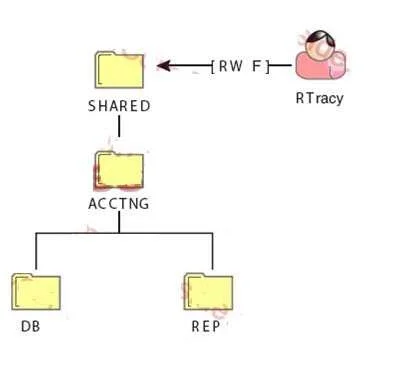
Click the Exhibit button to begin. The RTracy user object has been granted the file system rights shown in the exhibit to the SHARED directory on the DATA volume. What rights does RTracy have to the…
The correct answer is E. Read, Write, and File Scan. NetWare file system rights granted to a parent directory are inherited by all subdirectories by default, so RTracy's rights at SHARED flow down unchanged to SHARED\ACCTNG\REP.
Question
Exhibit
Options
- ANo rights
- BSupervisor
- CRead and File Scan
- DWrite and File Scan
- ERead, Write, and File Scan
- FRead, Write, File Scan, and Access Control
How the community answered
(26 responses)- A8% (2)
- B12% (3)
- D4% (1)
- E73% (19)
- F4% (1)
Why each option
NetWare file system rights granted to a parent directory are inherited by all subdirectories by default, so RTracy's rights at SHARED flow down unchanged to SHARED\ACCTNG\REP.
Rights are not lost when descending into subdirectories unless an IRF explicitly blocks them; without an IRF, inheritance is automatic.
Supervisor right is not shown in the exhibit as granted to RTracy at SHARED, so it cannot appear as an inherited right at the subdirectory.
Read and File Scan is incomplete because Write is also granted at the SHARED level and would be inherited in the absence of a filtering IRF.
Write and File Scan omits Read, which is granted at SHARED and would also be inherited unless blocked by an IRF.
In the NetWare file system, rights assigned at a directory level are inherited by every subdirectory unless explicitly filtered by an Inherited Rights Filter (IRF). The exhibit shows RTracy holds Read, Write, and File Scan at the SHARED directory, and because no IRF is indicated at SHARED\ACCTNG\REP, all three rights are inherited and remain effective there.
Access Control is not listed as a right granted to RTracy at SHARED, so it cannot appear as an inherited right at the subdirectory level.
Concept tested: NetWare file system rights inheritance through subdirectories
Source: https://www.novell.com/documentation/oes11sp2/file_nss_nw/data/fbachifj.html
Topics
Community Discussion
No community discussion yet for this question.