
000-221 · Question #64
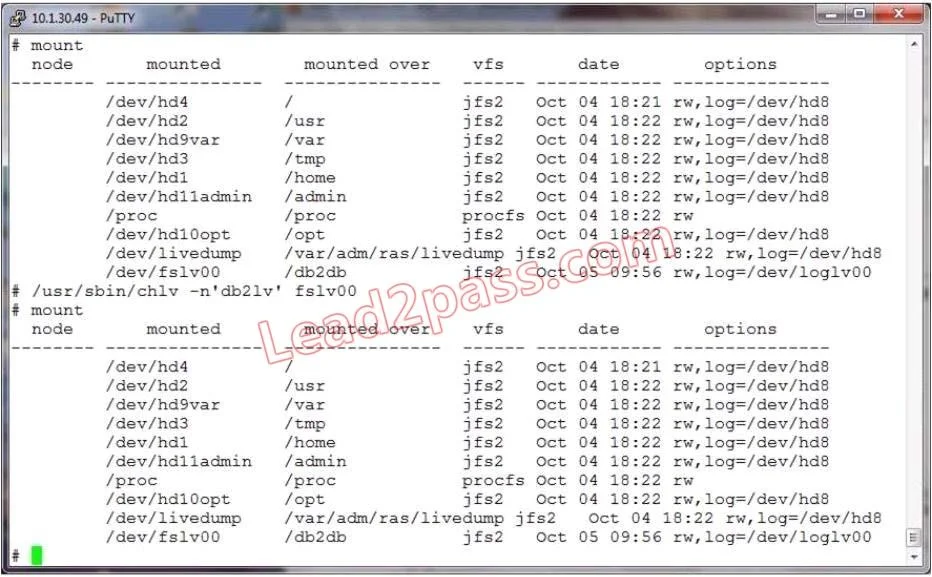
The following output shows that a logical volume was renamed, but the change does not appear to be effective. What is the most likely cause?
The correct answer is B. The filesystem needs to be remounted. After renaming a logical volume, the underlying LVM metadata updates immediately, but any mounted filesystem still references the old device path until remounted.
Question
The following output shows that a logical volume was renamed, but the change does not appear to be effective. What is the most likely cause?
Exhibit
Options
- AThe command did not perform the change.
- BThe filesystem needs to be remounted.
- COnly raw logical volumes can be renamed.
- DThe log device needs to be renamed as well.
- EThe volume group should have been inactive.
How the community answered
(26 responses)- A12% (3)
- B81% (21)
- C4% (1)
- D4% (1)
Why each option
After renaming a logical volume, the underlying LVM metadata updates immediately, but any mounted filesystem still references the old device path until remounted.
The question states the output shows the rename was performed, confirming the command did execute and the LVM-level change occurred.
When a logical volume is renamed, the LVM layer records the new name, but the active mount table continues to reference the old device path. Remounting the filesystem forces the operating system to resolve the updated device name, making the rename effective from the filesystem perspective.
LVM permits renaming of all logical volume types regardless of whether they hold a filesystem or are used as raw block devices.
A log device is an independent LVM resource and renaming a data logical volume does not require renaming any associated log device.
Volume group deactivation is required only for certain structural operations; renaming a logical volume does not require the volume group to be inactive.
Concept tested: Logical volume rename requiring filesystem remount
Source: https://www.ibm.com/docs/en/aix/7.3?topic=commands-chlv-command
Topics
Community Discussion
No community discussion yet for this question.