000-221 · Question #204
After recovering the rootvg from a backup, how can an administrator determine which disks contain the DB2 volume group?
The correct answer is C. Use the lqueryvg command to show the logical volumes on the disk. The lqueryvg command reads the Volume Group Descriptor Area (VGDA) directly from a physical disk, allowing an administrator to identify VG membership and logical volumes even when the volume group is not varied on.
Question
After recovering the rootvg from a backup, how can an administrator determine which disks contain the DB2 volume group?
Exhibit
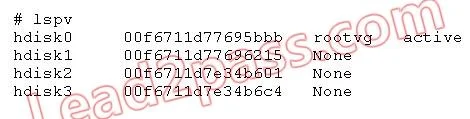
Options
- AUse the alt_disk_copy command to read the VGDA on the disk.
- BUse the lspv command to show the logical volumes on the disk.
- CUse the lqueryvg command to show the logical volumes on the disk.
- DUse the lsvg command to display the volume group name on the disk
How the community answered
(46 responses)- A7% (3)
- B17% (8)
- C72% (33)
- D4% (2)
Why each option
The lqueryvg command reads the Volume Group Descriptor Area (VGDA) directly from a physical disk, allowing an administrator to identify VG membership and logical volumes even when the volume group is not varied on.
alt_disk_copy is used to clone a running rootvg to an alternate disk for upgrade or maintenance purposes, not to inspect or read VGDA metadata from a disk.
The lspv command reports basic physical volume status and ODM-registered information, but cannot display logical volume details from a disk belonging to a varied-off or unimported volume group.
The lqueryvg command inspects on-disk VGDA metadata without requiring the volume group to be imported or varied on, making it the correct tool after a rootvg recovery when other VGs may not yet be activated. It can reveal which volume group owns a given disk and list its logical volumes by reading the descriptor area written to the disk itself. This is the intended AIX mechanism for querying offline or unrecognized VG metadata.
The lsvg command displays volume group attributes only for VGs that are already varied on and registered in the ODM; it cannot read VG data directly from a disk that has not been imported.
Concept tested: Querying VGDA on an offline disk using lqueryvg
Source: https://www.ibm.com/docs/en/aix/7.3?topic=l-lqueryvg-command
Topics
Community Discussion
No community discussion yet for this question.
