
000-221 · Question #51
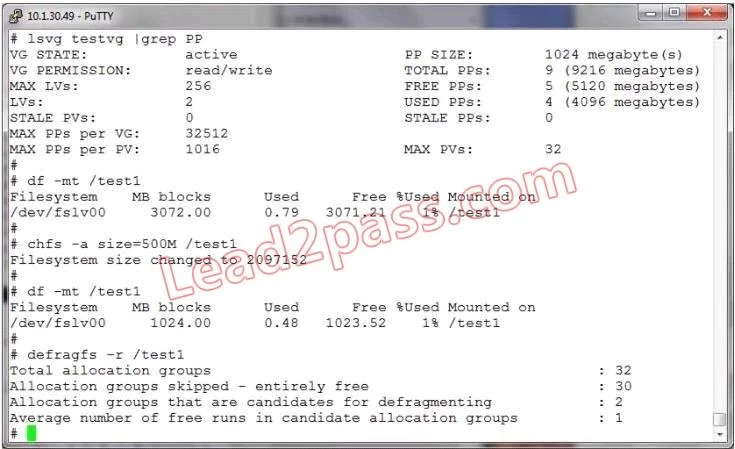
The /test1 filesystem was built larger than required. An effort to shrink the filesystem was made, but the resulting filesystem size is larger than the size specified. Given the following output…
The correct answer is B. The physical partition size. In AIX LVM, storage is allocated in fixed-size physical partitions, so a filesystem cannot be reduced below the nearest physical partition boundary, causing the result to be larger than the specified target size.
Question
The /test1 filesystem was built larger than required. An effort to shrink the filesystem was made, but the resulting filesystem size is larger than the size specified. Given the following output, what is the most likely reason?
Exhibit
Options
- AFragmentation of the filesystem
- BThe physical partition size
- CAmount of data in the filesystem
- DVolume group status
- EOptions chosen with the df command
How the community answered
(52 responses)- B83% (43)
- C10% (5)
- D2% (1)
- E6% (3)
Why each option
In AIX LVM, storage is allocated in fixed-size physical partitions, so a filesystem cannot be reduced below the nearest physical partition boundary, causing the result to be larger than the specified target size.
Filesystem fragmentation affects performance and free space layout but does not impose a minimum size granularity constraint when shrinking.
AIX LVM allocates storage in fixed-size physical partitions (PPs), and the size of a logical volume must be a multiple of the physical partition size. When shrinking a filesystem, the reduction is rounded up to the nearest PP boundary, so the resulting size may exceed the specified value if the target falls between two PP multiples.
Insufficient free space would prevent shrinking entirely, but the question states the operation succeeded - just not to the exact target size.
Volume group status such as active or concurrent mode does not control the granularity of filesystem size reductions.
The df command is used to display filesystem usage and does not influence the outcome or granularity of a resize operation.
Concept tested: AIX LVM physical partition size constraints on resize
Source: https://www.ibm.com/docs/en/aix/7.3?topic=management-logical-volume-manager
Topics
Community Discussion
No community discussion yet for this question.