
000-221 · Question #227
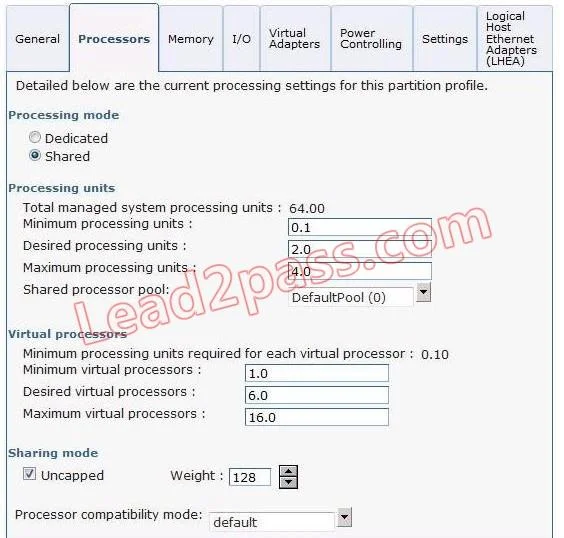
In the graphic below, the LPAR's current physical and virtual processor allocation matches its desired settings How do these settings limit system processor assignment for the LPAR?
The correct answer is B. The LPAR will be able to use a maximum of 6.0 processing units of capacity in the shared processing pool. In an LPAR shared processor profile, the maximum processing units field is the hard ceiling on how much shared pool CPU capacity the partition can consume.
Question
In the graphic below, the LPAR's current physical and virtual processor allocation matches its desired settings How do these settings limit system processor assignment for the LPAR?
Exhibit
Options
- AThe LPAR can increase to 16.00 processing units of capacity in the shared processing pool as needed.
- BThe LPAR will be able to use a maximum of 6.0 processing units of capacity in the shared processing pool.
- CThe LPAR will be able to use a maximum of 4.0 processing units of capacity in the shared processing pool.
- DThe administrator will be allowed to add a maximum of 4.0 additional processing units to the LPAR using
How the community answered
(37 responses)- A16% (6)
- B73% (27)
- C8% (3)
- D3% (1)
Why each option
In an LPAR shared processor profile, the maximum processing units field is the hard ceiling on how much shared pool CPU capacity the partition can consume.
16.00 processing units would only be possible if the maximum in the profile were set to 16.0; the graphic shows the maximum is 6.0, not 16.0.
The LPAR profile contains three processor settings - minimum, desired, and maximum. The maximum processing units value is the absolute upper bound on shared processor pool capacity the LPAR may use at any time. The graphic shows this maximum is set to 6.0, so regardless of available pool capacity, the LPAR cannot consume more than 6.0 processing units.
4.0 processing units reflects the current or desired allocation shown in the graphic, not the maximum; the profile's maximum field governs the ceiling, which is 6.0.
Dynamic LPAR operations to add processing units are also bounded by the profile maximum of 6.0, not by an independent limit of 4.0 additional units.
Concept tested: LPAR shared processor maximum processing units ceiling
Source: https://www.ibm.com/docs/en/power-systems/power8?topic=partitions-shared-processor
Topics
Community Discussion
No community discussion yet for this question.