
XSIAM-ENGINEER · Question #67
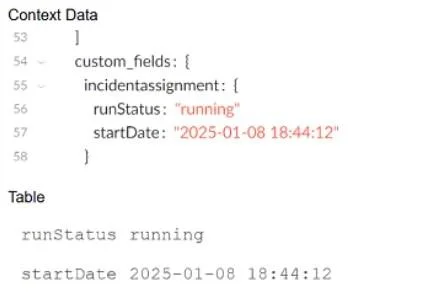
Based on the images below, which command will allow the context data to be displayed as a table when troubleshooting a playbook task?
The correct answer is C. !ToTable data=${parentIncidentFields.custom_fields.incidentassignment}. The correct command is !ToTable data=${parentIncidentFields.custom_fields.incidentassignment}, which converts the specified context data into a tabular format. This allows fields such as runStatus and startDate to be clearly displayed in a table when troubleshooting playbook…
Question
Based on the images below, which command will allow the context data to be displayed as a table when troubleshooting a playbook task?
Exhibit
Options
- A!ConvertTableToHTML table=${parentIncidentFields.custom_fields}
- B!JsonToTable value=${parentIncidentFields.custom_fields}
- C!ToTable data=${parentIncidentFields.custom_fields.incidentassignment}
- D!ExtractHTMLTables
How the community answered
(44 responses)- A5% (2)
- B14% (6)
- C77% (34)
- D5% (2)
Explanation
The correct command is !ToTable data=${parentIncidentFields.custom_fields.incidentassignment}, which converts the specified context data into a tabular format. This allows fields such as runStatus and startDate to be clearly displayed in a table when troubleshooting playbook tasks.
Topics
Community Discussion
No community discussion yet for this question.