
XK0-005 · Question #850
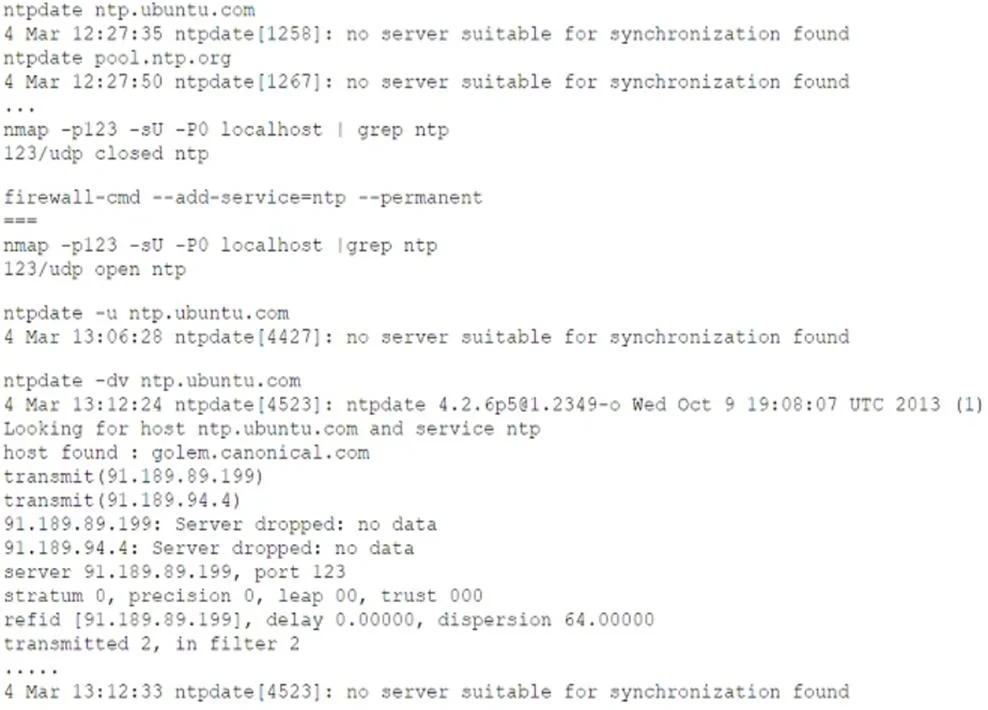
An administrator is unable to sync servers to the new NTP server IP address given by the service provider despite several attempts. Looking at the below output: Which of the following commands will…
The correct answer is D. firewall-cmd -- reload. After permanently adding the NTP service, you must reload firewalld’s runtime configuration before the change takes effect. Using: firewall-cmd --reload systemctl restart ntpd applies the new rule (opening UDP/123) and then restarts the NTP daemon so it can successfully
Question
An administrator is unable to sync servers to the new NTP server IP address given by the service provider despite several attempts. Looking at the below output:
Which of the following commands will help resolve the issue?
Exhibit
Options
- Afirewall-cmd --check-config
- Bfirewall-cmd --state
- Cfirewall-cmd -complete-reload
- Dfirewall-cmd -- reload
How the community answered
(34 responses)- A15% (5)
- B3% (1)
- C9% (3)
- D74% (25)
Explanation
After permanently adding the NTP service, you must reload firewalld’s runtime configuration before the change takes effect. Using: firewall-cmd --reload systemctl restart ntpd applies the new rule (opening UDP/123) and then restarts the NTP daemon so it can successfully
Topics
Community Discussion
No community discussion yet for this question.