
XK0-005 · Question #81
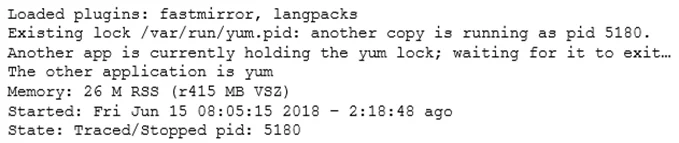
A junior Linux administrator is installing patches using YUM. The administrator issues the following command: yum list installed The output of the command is as follows: Given this scenario and the…
The correct answer is B. killall yum. YUM uses a lock file (/var/run/yum.pid) to prevent multiple instances from running simultaneously. If a previous yum process is still running (or was killed ungracefully and left a stale lock), subsequent yum commands will hang or display a 'Another app is currently holding the…
Question
A junior Linux administrator is installing patches using YUM. The administrator issues the following command:
yum list installed The output of the command is as follows:
Given this scenario and the output, which of the following should the administrator do to address this issue?
Exhibit
Options
- Arenice -n 9 -p 5180
- Bkillall yum
- Cps -ef | grep yum
- Dtop | grep yum
How the community answered
(19 responses)- A11% (2)
- B79% (15)
- C5% (1)
- D5% (1)
Explanation
YUM uses a lock file (/var/run/yum.pid) to prevent multiple instances from running simultaneously. If a previous yum process is still running (or was killed ungracefully and left a stale lock), subsequent yum commands will hang or display a 'Another app is currently holding the yum lock' error. The correct remediation is to kill the conflicting yum process with 'killall yum', which sends SIGTERM to all processes named 'yum', clearing the lock. After that, yum commands will run normally. 'renice' changes process priority (not relevant), 'ps -ef | grep yum' and 'top | grep yum' only display information without resolving the lock.
Topics
Community Discussion
No community discussion yet for this question.