
CompTIA
XK0-005 · Question #1871
A user receives the following message when attempting to log in to a Linux workstation with the account named "developer": This account is currently not available A Linux administrator, who is…
The correct answer is C. usermod developer -s /bin/bash. The account’s login shell is set to /sbin/nologin (which prevents interactive logins). Using usermod -s /bin/bash developer changes the shell to a valid login shell (/bin/bash), allowing the user to log in.
Troubleshooting
Question
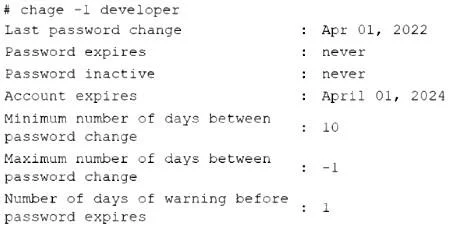
A user receives the following message when attempting to log in to a Linux workstation with the account named "developer": This account is currently not available A Linux administrator, who is working on the issue for the user, runs a few commands and receives the following output: Output 1: # grep -i developer /etc/passwd developer:x:1000:1000:Dev User:/home/developer:/sbin/nologin Output 2: # faillock ---user developer developer: When Type Source Valid # Output 3: # passwd -S developer developer PS 2022-03-09 0 99999 7 -l (Password set, unknown crypt variant.) Output 4: Which of the following commands can the administrator use to resolve the login issue for the account named "developer"?
Exhibit
Options
- Apasswd -u developer
- Bchage -M -l developer
- Cusermod developer -s /bin/bash
- Dfaillock --user developer --reset
How the community answered
(21 responses)- A5% (1)
- C81% (17)
- D14% (3)
Explanation
The account’s login shell is set to /sbin/nologin (which prevents interactive logins). Using usermod -s /bin/bash developer changes the shell to a valid login shell (/bin/bash), allowing the user to log in.
Topics
#User management#Login troubleshooting#Linux shells#Account configuration
Community Discussion
No community discussion yet for this question.