
XK0-005 · Question #1769
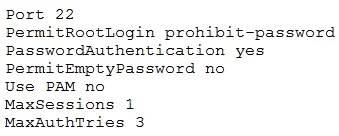
A Linux administrator attempts to log in to a server over SSH as root, and receives the following error message: Permission denied, please try again. The administrator is able to log in to the…
The correct answer is D. Use a key to log in as root over SSH. Based on the SSH configuration shown in the image, let's analyze the settings: PermitRootLogin prohibit-password: This setting disables password authentication for the root user, meaning root cannot log in using a password but can still log in using key-based…
Question
Exhibit
Options
- ALog out other user sessions because only one is allowed at a time.
- BEnable PAM and configure the SSH module.
- CModify the SSH port to use 2222.
- DUse a key to log in as root over SSH.
How the community answered
(54 responses)- A2% (1)
- B11% (6)
- C4% (2)
- D83% (45)
Explanation
Based on the SSH configuration shown in the image, let's analyze the settings: PermitRootLogin prohibit-password: This setting disables password authentication for the root user, meaning root cannot log in using a password but can still log in using key-based PasswordAuthentication yes: Password authentication is enabled for non-root users. Use PAM no: PAM (Pluggable Authentication Modules) is disabled. MaxSessions 1: Only one session is allowed at a time. MaxAuthTries 3: Limits the number of authentication attempts. Since the PermitRootLogin prohibit-password option is set, root cannot log in using a password but can log in using SSH key-based authentication.
Topics
Community Discussion
No community discussion yet for this question.