
XK0-005 · Question #1753
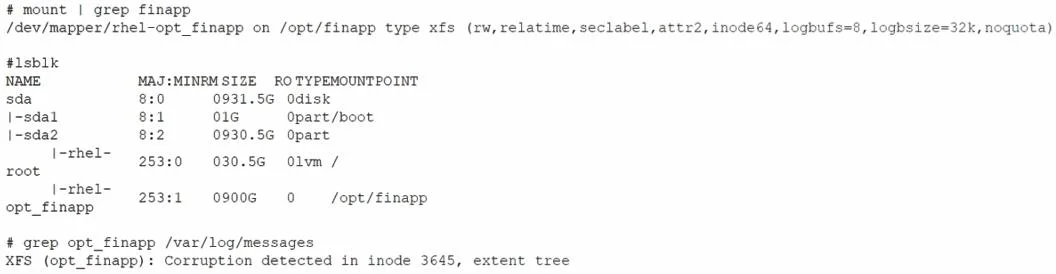
Users report that they cannot access some files located in the /opt /finapp directory after a power outage caused an unexpected server restart. A Linux administrator examines the following…
The correct answer is B. xfs_repair /dev/mapper/rhel-opt_finapp. For repairing XFS filesystems, the appropriate command is xfs_repair. Since the /opt/finapp directory resides on an XFS filesystem (indicated in the mount output), xfs_repair is suitable for diagnosing and fixing corruption in XFS inodes and extent trees. Using fdisk or…
Question
Exhibit
Options
- Afdisk /dev/mapper/rhel-opt_finapp
- Bxfs_repair /dev/mapper/rhel-opt_finapp
- Clvcreate -L900G -n opt_finapp rhel
- Dfsck.ext4 /dev/mapper/rhel-opt_finapp
How the community answered
(32 responses)- A6% (2)
- B78% (25)
- C3% (1)
- D13% (4)
Explanation
For repairing XFS filesystems, the appropriate command is xfs_repair. Since the /opt/finapp directory resides on an XFS filesystem (indicated in the mount output), xfs_repair is suitable for diagnosing and fixing corruption in XFS inodes and extent trees. Using fdisk or fsck.ext4 is not appropriate for XFS filesystems, as these commands are intended for partitioning and ext4 filesystems, respectively.
Topics
Community Discussion
No community discussion yet for this question.