
CompTIA
XK0-005 · Question #1681
A systems administrator receives the following errors via email from the system log: XFS (lcop0): Metadata CRC error detected at xfs_agi_read_verify+0xcb/Oxfe XFS (loop0): First 12@ bytes of…
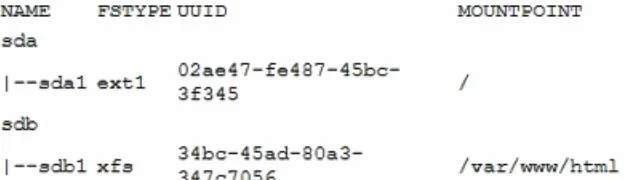
The correct answer is A. systemctl stop httpd. The error is related to XFS filesystem corruption on /dev/sdb1, where the website's images are stored. By stopping the Apache service, unmounting the filesystem, running xfs_repair, and remounting, the filesystem can be repaired, and the service can be restarted safely.
Troubleshooting
Question
A systems administrator receives the following errors via email from the system log: XFS (lcop0): Metadata CRC error detected at xfs_agi_read_verify+0xcb/Oxfe XFS (loop0): First 12@ bytes of corrupted metadata buffer XFS (loop0): metadata I/O error in "xfs_trans_read_buf_map" at daddr 0x2 len 1 error 74 A few minutes later, the administrator starts receiving reports that some of the images in the company's website are not loading properly. The systems administrator runs some commands and receives the following outputs: Output 1: Output 2: DocumentRoot "/var/www/html" Output 3: Which of the following would be the appropriate steps to take to solve this issue?
Exhibits

Options
- Asystemctl stop httpd
- Bumount /dev/sdb1
- Cumount /dev/sdb1
- Dsystemctl stop httpd
How the community answered
(41 responses)- A78% (32)
- B12% (5)
- C2% (1)
- D7% (3)
Explanation
The error is related to XFS filesystem corruption on /dev/sdb1, where the website's images are stored. By stopping the Apache service, unmounting the filesystem, running xfs_repair, and remounting, the filesystem can be repaired, and the service can be restarted safely.
Topics
#Filesystem Corruption#Troubleshooting#Service Management#Apache HTTP Server
Community Discussion
No community discussion yet for this question.