
XK0-005 · Question #1643
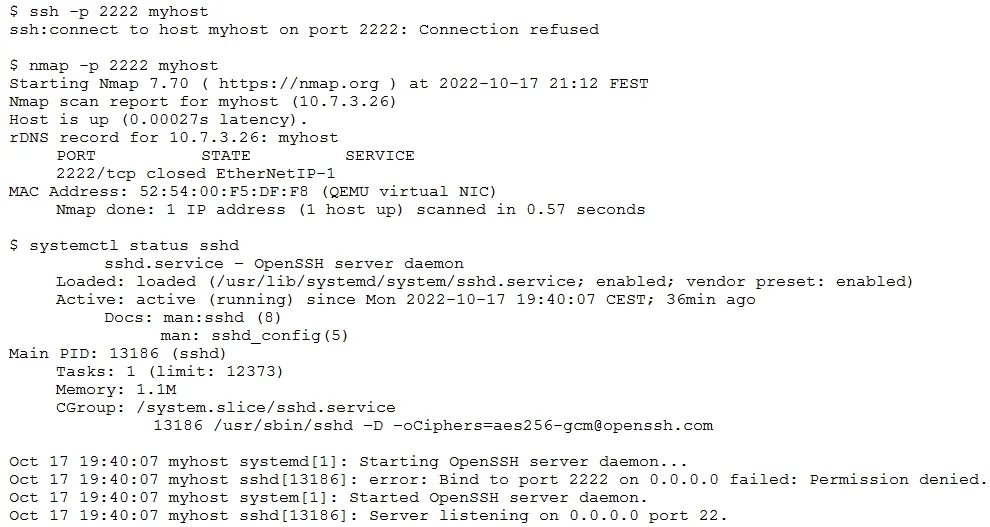
An administrator added the port 2222 for the SSH server on myhost and restarted the SSH server. The administrator noticed issues during the startup of the service. Given the following outputs: Which…
The correct answer is A. semanage port -a -t ssh_port_t -p tcp 2222. This command will allow the SSH server to bind to port 2222 by adding it to the SELinux policy. The semanage command is a utility for managing SELinux policies. The port subcommand is used to manage network port definitions. The -a option is used to add a new record, the -t…
Question
Exhibit
Options
- Asemanage port -a -t ssh_port_t -p tcp 2222
- Bchcon system_u:object_r:ssh_home_t /etc/ssh/*
- Ciptables -A INPUT -p tcp -- dport 2222 -j ACCEPT
- Dfirewall-cmd -- zone=public -- add-port=2222/tcp
How the community answered
(43 responses)- A84% (36)
- B2% (1)
- C9% (4)
- D5% (2)
Explanation
This command will allow the SSH server to bind to port 2222 by adding it to the SELinux policy. The semanage command is a utility for managing SELinux policies. The port subcommand is used to manage network port definitions. The -a option is used to add a new record, the -t option is used to specify the SELinux type, the -p option is used to specify the protocol, and the tcp 2222 argument is used to specify the port number. The ssh_port_t type is the default type for SSH ports in SELinux.
Topics
Community Discussion
No community discussion yet for this question.