
XK0-005 · Question #1524
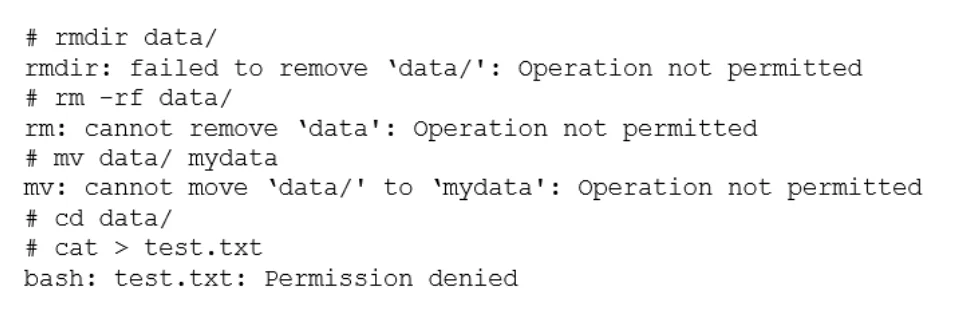
A developer has been unable to remove a particular data folder that a team no longer uses. The developer escalated the issue to the systems administrator. The following output was received: Which of…
The correct answer is C. chattr -R -i data/. The command that can be used to resolve the issue of being unable to remove a particular data folder is chattr -R -i data/. This command will use the chattr utility to change file attributes on a Linux file system. The -R option means that chattr will recursively change…
Question
Exhibit
Options
- Achgrp -R 755 data/
- Bchmod -R 777 data/
- Cchattr -R -i data/
- Dchown -R data/
How the community answered
(30 responses)- A3% (1)
- B17% (5)
- C73% (22)
- D7% (2)
Explanation
The command that can be used to resolve the issue of being unable to remove a particular data folder is chattr -R -i data/. This command will use the chattr utility to change file attributes on a Linux file system. The -R option means that chattr will recursively change attributes of directories and their contents. The -i option means that chattr will remove (unset) the immutable attribute from files or directories. When a file or directory has the immutable attribute set, it cannot be modified, deleted, or renamed.
Topics
Community Discussion
No community discussion yet for this question.