
XK0-005 · Question #1514
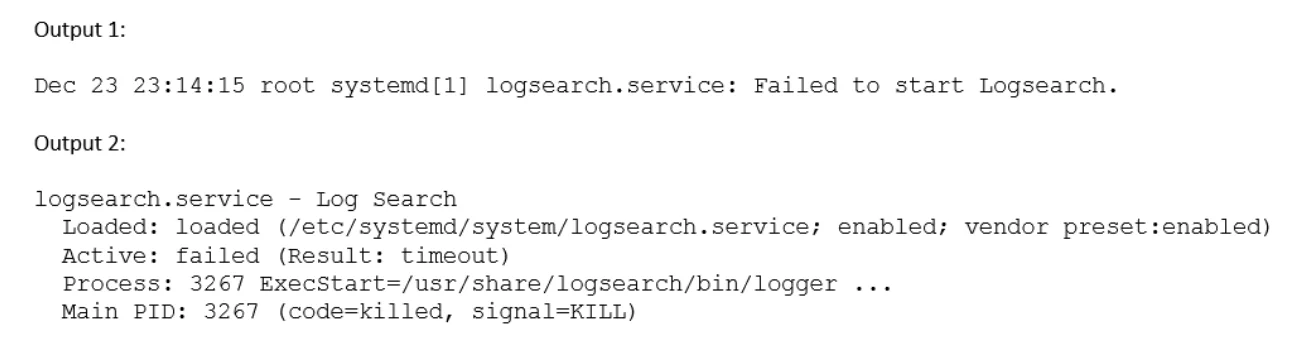
A Linux administrator is troubleshooting an issue in which an application service failed to start on a Linux server. The administrator runs a few commands and gets the following outputs: Based on…
The correct answer is B. Increase the TimeoutStartUSec configuration for the logsearch.sevice. When systemd output shows a service entering a 'start-pre' or 'activating' state and then failing, combined with a timeout-related message (e.g., 'start operation timed out'), it indicates the service is taking longer to initialize than the default timeout allows. The…
Question
Exhibit
Options
- AEnable the logsearch.service and restart the service.
- BIncrease the TimeoutStartUSec configuration for the logsearch.sevice.
- CUpdate the OnCalendar configuration to schedule the start of the logsearch.service.
- DUpdate the KillSignal configuration for the logsearch.service to use TERM.
How the community answered
(55 responses)- A4% (2)
- B73% (40)
- C16% (9)
- D7% (4)
Explanation
When systemd output shows a service entering a 'start-pre' or 'activating' state and then failing, combined with a timeout-related message (e.g., 'start operation timed out'), it indicates the service is taking longer to initialize than the default timeout allows. The TimeoutStartUSec directive in the service's unit file controls how long systemd waits for the service to report as started. Increasing this value gives the application more time to complete its startup sequence. Option A (enable + restart) would not fix a timeout issue. Option C applies to timer units, not service startup. Option D (KillSignal) affects how the service is terminated, not how it starts.
Topics
Community Discussion
No community discussion yet for this question.