
CompTIA
XK0-005 · Question #1499
An administrator deployed a Linux server that is running a web application on port 6379/tcp. - SELinux is in enforcing mode based on organization policies. - The port is open on the firewall…
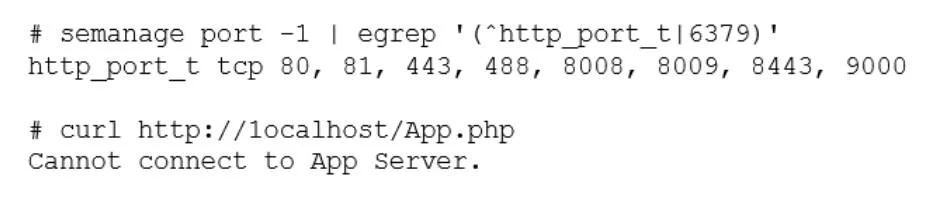
The correct answer is B. semanage port -a -t http_port_t -p tcp 6379. The command semanage port -a -t http_port_t -p tcp 6379 adds a new port definition to the SELinux policy and assigns the type http_port_t to the port 6379/tcp. This allows the web application to run on this port and accept connections from users. This is the correct way to…
Troubleshooting
Question
An administrator deployed a Linux server that is running a web application on port 6379/tcp. - SELinux is in enforcing mode based on organization policies. - The port is open on the firewall. - Users who are trying to connect to a local instance of the web application receive Error 13, Permission denied. The administrator ran some commands that resulted in the following output: Which of the following commands should be used to resolve the issue?
Exhibit
Options
- Asemanage port -d -t http_port_t -p tcp 6379
- Bsemanage port -a -t http_port_t -p tcp 6379
- Csemanage port -a http_port_t -p top 6379
- Dsemanage port -l -t http_port_tcp 6379
How the community answered
(59 responses)- A8% (5)
- B71% (42)
- C15% (9)
- D5% (3)
Explanation
The command semanage port -a -t http_port_t -p tcp 6379 adds a new port definition to the SELinux policy and assigns the type http_port_t to the port 6379/tcp. This allows the web application to run on this port and accept connections from users. This is the correct way to resolve the issue.
Topics
#SELinux#Port Management#Linux Security#Troubleshooting
Community Discussion
No community discussion yet for this question.