
XK0-005 · Question #1456
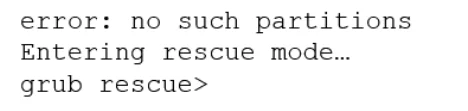
A Linux system is failing to boot with the following error: Which of the following actions will resolve this issue? (Choose two.)
The correct answer is B. Execute grub-install /dev/sdX and reboot. F. Boot the system on a LiveCD/ISO. When GRUB is corrupted or missing from the MBR, the system cannot boot on its own. The two-step recovery process is: First (F), boot from external media such as a LiveCD or ISO, which gives you a working OS environment with disk access. Then (B), execute grub-install /dev/sdX…
Question
Exhibit
Options
- AExecute grub-install --root-directory=/mnt and reboot.
- BExecute grub-install /dev/sdX and reboot.
- CInterrupt the boot process in the GRUB menu and add rescue to the kernel line.
- DFix the partition modifying /etc/default/grub and reboot.
- EInterrupt the boot process in the GRUB menu and add single to the kernel line.
- FBoot the system on a LiveCD/ISO.
How the community answered
(23 responses)- A13% (3)
- B78% (18)
- C4% (1)
- D4% (1)
Explanation
When GRUB is corrupted or missing from the MBR, the system cannot boot on its own. The two-step recovery process is: First (F), boot from external media such as a LiveCD or ISO, which gives you a working OS environment with disk access. Then (B), execute grub-install /dev/sdX (where sdX is the target drive, e.g., /dev/sda) to reinstall GRUB to the MBR of the disk, then reboot. These two steps work together. Option A uses --root-directory=/mnt which is for chroot scenarios but does not apply cleanly without the LiveCD step first. Option C (adding 'rescue') and E (adding 'single') modify kernel boot parameters for recovery modes, but if GRUB itself is broken, the menu cannot even be reached to edit kernel lines. Option D modifies /etc/default/grub which configures GRUB options but does not reinstall a missing/corrupt bootloader.
Topics
Community Discussion
No community discussion yet for this question.