
XK0-005 · Question #1279
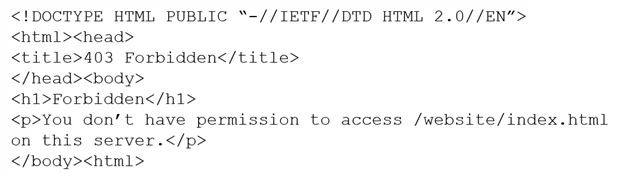
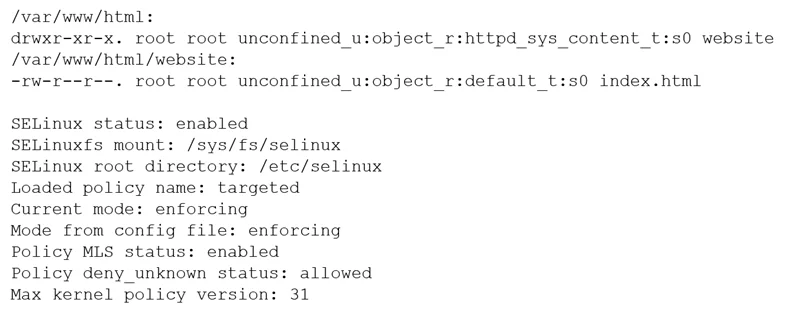
While trying to access a website hosted on the server, the systems administrator receives the following error message: The administrator then performs some diagnostics: Which of the following…
The correct answer is D. restorecon /var/www/html/website/index.html. If a website access error suggests a permissions issue and diagnostics point away from standard file permissions, the restorecon command should be used. This command restores default SELinux security contexts, often resolving access denied errors caused by incorrect file…
Question
Exhibits
Options
- Achown -R www:www /var/www/website
- Cchmod -R 777 /var/www/website
- Drestorecon /var/www/html/website/index.html
How the community answered
(39 responses)- A10% (4)
- C5% (2)
- D85% (33)
Why each option
If a website access error suggests a permissions issue and diagnostics point away from standard file permissions, the `restorecon` command should be used. This command restores default SELinux security contexts, often resolving access denied errors caused by incorrect file labeling.
`chown -R www:www /var/www/website` would change the ownership of files and directories, addressing DAC permissions but not the SELinux contexts that might be denying access.
`chmod -R 777 /var/www/website` would grant maximum permissions to everyone, which is a major security risk and would only address DAC permissions, not the underlying SELinux context issue.
The `restorecon` command is used to restore the default SELinux security contexts on files and directories. If a file's SELinux context is incorrect (e.g., after being moved or copied without preserving context), the web server's access might be denied, even if standard discretionary access control (DAC) permissions are correct. Running `restorecon` relabels the file to its proper context, allowing SELinux to permit access.
Concept tested: SELinux context restoration
Source: https://man7.org/linux/man-pages/man8/restorecon.8.html
Topics
Community Discussion
No community discussion yet for this question.