
XK0-005 · Question #1227
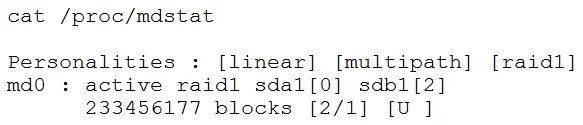
A Linux administrator receives a call from the network operations team that one of the database applications is down on a Linux server. The Linux server is configured with RAID 1 for redundancy, and…
The correct answer is A. mdadm /dev/md0 --remove /dev/sdb1 C. mdadm /dev/md0 --fail /dev/sdb1. Removing a failed drive from a Linux software RAID array managed by mdadm requires two sequential steps. First, the device must be marked as faulty using 'mdadm /dev/md0 --fail /dev/sdb1' (Choice C) - this tells the RAID array that the drive has failed, even if mdadm hasn't…
Question
Exhibit
Options
- Amdadm /dev/md0 --remove /dev/sdb1
- Bmdadm /dev/sdb1 --fail /dev/md0
- Cmdadm /dev/md0 --fail /dev/sdb1
- Dmdadm /dev/sdb1 --remove /dev/md0
- Eracadm --remove /dev/sdb1
- Fracadm --fail /dev/sdb1
How the community answered
(36 responses)- A72% (26)
- B3% (1)
- D6% (2)
- E14% (5)
- F6% (2)
Explanation
Removing a failed drive from a Linux software RAID array managed by mdadm requires two sequential steps. First, the device must be marked as faulty using 'mdadm /dev/md0 --fail /dev/sdb1' (Choice C) - this tells the RAID array that the drive has failed, even if mdadm hasn't already marked it as such automatically. Second, the device is removed from the array using 'mdadm /dev/md0 --remove /dev/sdb1' (Choice A) - a device cannot be removed unless it is first in a failed state. In both commands, the array device (/dev/md0) is specified first as the target, followed by the member device (/dev/sdb1). Choices B and D have the arguments reversed, which is invalid syntax. Choices E and F reference 'racadm', which is a Dell-specific remote management tool unrelated to Linux software RAID.
Topics
Community Discussion
No community discussion yet for this question.