
XK0-005 · Question #1129
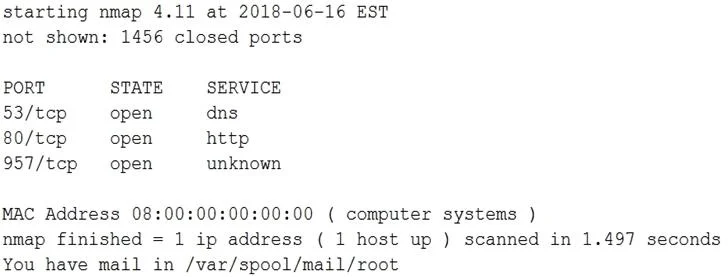
All users are reporting that they cannot connect to the SFTP server. The administrator runs a scan: Which of the following would allow the administrator to fix the problem?
The correct answer is A. Allow SFTP connections on port 22 using /etc/sysconfig/iptables. If users cannot connect to an SFTP server, and a firewall is blocking connections, the administrator must configure the firewall to allow traffic on the standard SFTP port. SFTP operates over SSH, which uses TCP port 22 by default.
Question
Exhibit
Options
- AAllow SFTP connections on port 22 using /etc/sysconfig/iptables.
- BAllow SFTP connections on port 20 and 21 using /etc/sysconfig/iptables.
- CAllow SFTP connections on port 25 using /etc/sysconfig/iptables.
- DAllow SFTP connections on port 1456 using /etc/sysconfig/iptables.
How the community answered
(25 responses)- A92% (23)
- B4% (1)
- C4% (1)
Why each option
If users cannot connect to an SFTP server, and a firewall is blocking connections, the administrator must configure the firewall to allow traffic on the standard SFTP port. SFTP operates over SSH, which uses TCP port 22 by default.
SFTP (SSH File Transfer Protocol) utilizes the SSH protocol, which by default listens on TCP port 22. To allow users to connect to the SFTP server, the firewall (configured via `/etc/sysconfig/iptables` in some Linux distributions) must be configured to permit incoming connections on port 22.
Ports 20 and 21 are used by FTP (File Transfer Protocol), not SFTP. Allowing these ports would not fix SFTP connection issues.
Port 25 is used for SMTP (Simple Mail Transfer Protocol), which is unrelated to SFTP.
Port 1456 is not a standard port for SFTP or any commonly related file transfer protocol; using this port would be non-standard and would not resolve the issue if SFTP is configured on port 22.
Concept tested: SFTP default port and firewall configuration
Source: https://man7.org/linux/man-pages/man5/sshd_config.5.html
Topics
Community Discussion
No community discussion yet for this question.