
XK0-005 · Question #1124
A Linux administrator has installed a web application firewall in front of a web server running on HTTP port 8080 and successfully started the HTTP server. However, after opening the application URL…
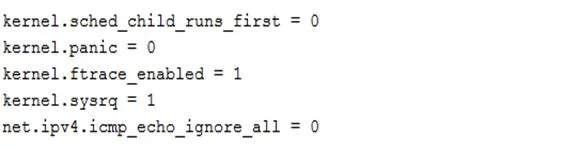
The correct answer is B. Edit file and add then run. To permanently enable IP forwarding at the kernel level, which is necessary for a web application firewall to forward traffic to a backend web server, the administrator must edit the /etc/sysctl.conf file to set net.ipv4.ip_forward=1 and then apply the changes using sysctl -p.
Question
Exhibits
Options
- Asysctl -w net.ipv4.ip_forward=1 then run sysctl -w /etc/sysctl.conf to enable
- BEdit file and add then run
- CAdd iptables rule iptables -A INPUT -m state --state NEW -p tcp --dport 8080
- DAdd iptables rule iptables -A FORWARD-m state --state NEW -p tcp --dport 8080
How the community answered
(23 responses)- A17% (4)
- B70% (16)
- C4% (1)
- D9% (2)
Why each option
To permanently enable IP forwarding at the kernel level, which is necessary for a web application firewall to forward traffic to a backend web server, the administrator must edit the `/etc/sysctl.conf` file to set `net.ipv4.ip_forward=1` and then apply the changes using `sysctl -p`.
`sysctl -w net.ipv4.ip_forward=1` only temporarily enables IP forwarding until the next reboot. `sysctl -w /etc/sysctl.conf` is not a valid command to make changes persistent; `sysctl -p /etc/sysctl.conf` or simply `sysctl -p` is used to load configuration from the file.
This option implies editing `/etc/sysctl.conf` to persistently set `net.ipv4.ip_forward=1` and then applying the changes with `sysctl -p`. Enabling IP forwarding at the kernel level is essential for a WAF to route traffic from its external interface to the internal web server interface.
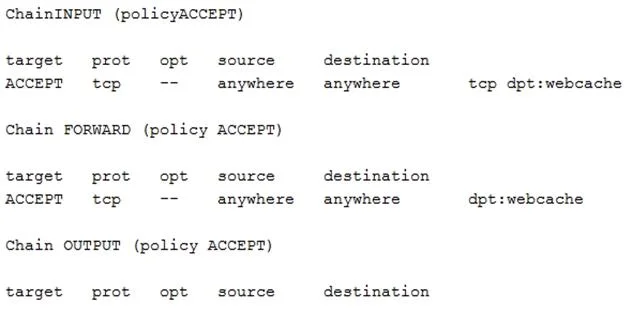
Adding an `iptables` INPUT rule for port 8080 would allow incoming connections to the WAF itself on that port, not facilitate forwarding through the WAF to the backend server.
Adding an `iptables` FORWARD rule might be necessary after IP forwarding is enabled, but it won't fix the underlying kernel-level issue if IP forwarding is disabled entirely.
Concept tested: Kernel IP forwarding persistence
Source: https://access.redhat.com/documentation/en-us/red_hat_enterprise_linux/9/html/configuring_and_managing_networking/configuring-ip-forwarding_configuring-and-managing-networking
Topics
Community Discussion
No community discussion yet for this question.