
XK0-004 · Question #534
A newly deployed application is not able to reach the database that is running on a Linux server. The connection should occur at port 1521/tcp from appsrv 192.168.1.11 to dbsrv 192.168.1.12. A…
The correct answer is C. Option C E. Option E. When a database port is unreachable on a Linux server despite the service running, the cause is typically a host firewall rule blocking inbound traffic, requiring a rule addition and a configuration reload to take effect persistently.
Question
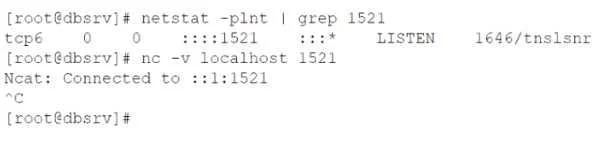
A newly deployed application is not able to reach the database that is running on a Linux server. The connection should occur at port 1521/tcp from appsrv 192.168.1.11 to dbsrv 192.168.1.12. A server administrator runs a few diagnostic commands with following results:
The same command when run from the application server gives the following result:
Both machines are in the same IP subnet, so no external network device is causing the issue. Which of the following commands BEST solves the connectivity issue at the dbsrv machine? (Choose two)
Exhibits
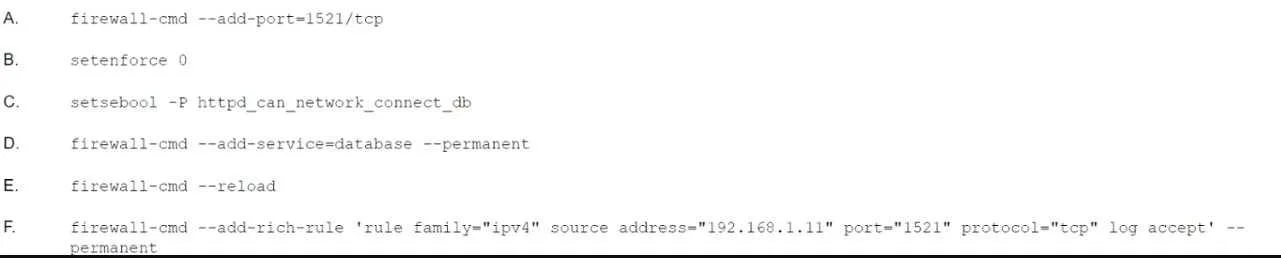
Options
- AOption A
- BOption B
- COption C
- DOption D
- EOption E
- FOption F
How the community answered
(26 responses)- A4% (1)
- B4% (1)
- C58% (15)
- D23% (6)
- F12% (3)
Why each option
When a database port is unreachable on a Linux server despite the service running, the cause is typically a host firewall rule blocking inbound traffic, requiring a rule addition and a configuration reload to take effect persistently.
This option targets a different aspect of the networking stack or applies an incorrect rule that would not open port 1521/tcp for inbound connections on dbsrv.
This option does not configure the firewall to permit traffic on port 1521/tcp or does not apply the change to the correct network interface or zone on dbsrv.
Option C adds a firewall rule on dbsrv using firewall-cmd to permit inbound TCP traffic on port 1521, which is the default Oracle Database listener port, directly addressing the blocked connection from appsrv at 192.168.1.11.
This option does not resolve the firewall blocking condition between appsrv and dbsrv, or applies a change to the wrong host or service.
Option E reloads or makes the firewall rule persistent with --reload or --permanent, ensuring the newly added port 1521 rule is applied to the live firewall state and survives a system reboot, completing the fix initiated by option C.
This option either targets an incorrect port, protocol, or direction, and would not allow the required TCP traffic on port 1521 from 192.168.1.11 to 192.168.1.12.
Concept tested: firewalld rule configuration for database port access
Source: https://access.redhat.com/documentation/en-us/red_hat_enterprise_linux/9/html/securing_networks/using-and-configuring-firewalld_securing-networks
Topics
Community Discussion
No community discussion yet for this question.