
XK0-004 · Question #532
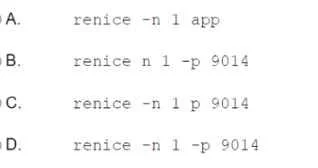
A Linux administrator is optimizing a system in which an application needs to change the priority to one for the running process: 9014. Which of the following commands will achieve this task?
The correct answer is D. Option D. Changing the scheduling priority of an already-running Linux process is done with the renice command, specifying the new nice value and the target process ID.
Question
A Linux administrator is optimizing a system in which an application needs to change the priority to one for the running process: 9014. Which of the following commands will achieve this task?
Exhibit
Options
- AOption A
- BOption B
- COption C
- DOption D
How the community answered
(44 responses)- B2% (1)
- C5% (2)
- D93% (41)
Why each option
Changing the scheduling priority of an already-running Linux process is done with the renice command, specifying the new nice value and the target process ID.
This option uses an incorrect syntax or command that does not properly invoke renice with the required nice value of 1 and process ID 9014.
This option specifies the wrong flag combination or argument order for renice, causing it to fail or target the wrong attribute of the process.
This option may use the nice command rather than renice, which is used to launch a new process with a given priority, not to alter an already-running process.
Option D uses the correct renice syntax to target process ID 9014 and set its nice value to 1, which adjusts its CPU scheduling priority without restarting it. The renice command operates on running processes and accepts a niceness value (-20 to 19, where lower values mean higher priority) along with a PID, making it the precise tool for this task.
Concept tested: Adjusting running process priority with renice
Source: https://man7.org/linux/man-pages/man1/renice.1.html
Topics
Community Discussion
No community discussion yet for this question.