
XK0-004 · Question #445
A Linux administrator executed 1vextend to expand disk space to a partition from 8GB to 40GB. However, the filesystem is not showing the additional space. The administrator runs several commands and…
The correct answer is B. mkfa_growffa /dev/mapper/Vci;r=.:p00-LogVo100. After lvextend enlarges a logical volume, the XFS filesystem must be separately expanded with xfs_growfs to expose the additional space to the OS.
Question
A Linux administrator executed 1vextend to expand disk space to a partition from 8GB to 40GB. However, the filesystem is not showing the additional space. The administrator runs several commands and rectyes the following output:
Which of the following commands should the administrator run to resolve the issue?
Exhibit
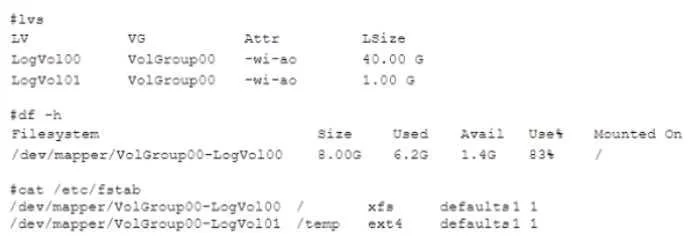
Options
- AmXfs.extt /dev/mapper/VolQroup00-LogVo100
- Bmkfa_growffa /dev/mapper/Vci;r=.:p00-LogVo100
- Creaize2ffa /dev/mapper/VolGroup00-LogVo100
- Dparted -a opt /dev/mapper/VolGroup00-LogVo100
How the community answered
(32 responses)- A3% (1)
- B72% (23)
- C9% (3)
- D16% (5)
Why each option
After lvextend enlarges a logical volume, the XFS filesystem must be separately expanded with xfs_growfs to expose the additional space to the OS.
mkfs.ext (or any mkfs variant) formats the device as a brand-new filesystem, which would destroy all existing data rather than non-destructively growing the current one.
xfs_growfs (shown in OCR-corrupted form in choice B) instructs the XFS filesystem layer to expand into all newly available space within the logical volume after lvextend has resized the block device. The lvextend command only grows the underlying block device - the filesystem metadata remains the original size until xfs_growfs is run against it. Unlike resize2fs for ext-family filesystems, xfs_growfs is the correct tool for XFS and supports live, online expansion without unmounting.
resize2fs is designed exclusively for ext2, ext3, and ext4 filesystems - it cannot resize an XFS filesystem and will fail with an error when run against one.
parted is a partition table editor for creating or modifying partition boundaries on raw disks, not a tool for resizing filesystems that reside on LVM logical volumes.
Concept tested: Resizing XFS filesystem after LVM logical volume extension
Source: https://access.redhat.com/documentation/en-us/red_hat_enterprise_linux/8/html/managing_file_systems/increasing-the-size-of-an-xfs-file-system_managing-file-systems
Topics
Community Discussion
No community discussion yet for this question.