
XK0-004 · Question #410
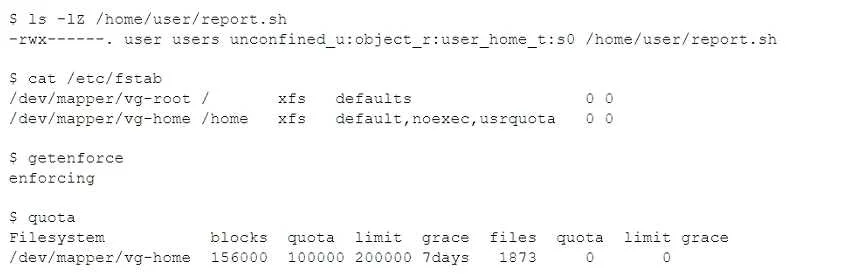
A user created a report.sh script in the home directory. When executing /home/user/report.sh the user receives the following error message: The user executes the following diagnostic commands: Which…
The correct answer is A. SELinux is blocking the script. SELinux enforcing mode can block script execution in user home directories even when standard file permissions appear correct, producing permission denied errors that only SELinux audit logs or context commands reveal.
Question
A user created a report.sh script in the home directory. When executing /home/user/report.sh the user receives the following error message:
The user executes the following diagnostic commands:
Which of the following is causing the error message?
Exhibit
Options
- ASELinux is blocking the script.
- BThe server disk is full.
- CThe server configuration does not allow running binaries in user home directories.
- DThe user has exceeded the allowed disk usage in the home directory.
How the community answered
(48 responses)- A50% (24)
- B6% (3)
- C29% (14)
- D15% (7)
Why each option
SELinux enforcing mode can block script execution in user home directories even when standard file permissions appear correct, producing permission denied errors that only SELinux audit logs or context commands reveal.
SELinux uses mandatory access controls that operate independently of standard Linux file permissions. When in enforcing mode, its policy may deny execution of scripts in home directories - the diagnostic commands shown likely included 'ausearch -m avc' or 'ls -Z', which would reveal SELinux denial entries or an incorrect security context on the script file, confirming SELinux as the blocker.
A full disk produces errors related to write operations or file creation, not script execution permission errors.
Preventing execution of binaries in home directories is controlled by the 'noexec' mount option on /home, which produces a different error and affects all users uniformly - not dependent on diagnostic context commands.
Exceeding a disk quota blocks file writes and new file creation, not the execution of already-existing scripts.
Concept tested: SELinux enforcing mode blocking home directory script execution
Source: https://access.redhat.com/documentation/en-us/red_hat_enterprise_linux/8/html/using_selinux/troubleshooting-problems-related-to-selinux_using-selinux
Topics
Community Discussion
No community discussion yet for this question.