
XK0-004 · Question #347
A Linux administrator is investigating an issue with an internal Linux server that is unable to resolve the following internal addresses: The administrator runs the following commands as part of…
The correct answer is A. Allow outbound DNS traffic to the internal DNS server. The internal server cannot reach the internal DNS server because a firewall is blocking outbound DNS traffic on port 53. Permitting that traffic restores internal hostname resolution.
Question
A Linux administrator is investigating an issue with an internal Linux server that is unable to resolve the following internal addresses:
The administrator runs the following commands as part of troubleshooting:
Which of the following is MOST likely resolve the issue?
Exhibit
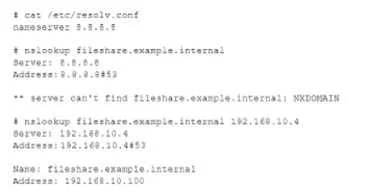
Options
- AAllow outbound DNS traffic to the internal DNS server.
- BAdd a public DNS for fileshare, example, internal.
- CInstall a caching DNS server on the local workstation.
- DUpdate resolve, conf to use the internal DNS server.
How the community answered
(49 responses)- A80% (39)
- B2% (1)
- C8% (4)
- D10% (5)
Why each option
The internal server cannot reach the internal DNS server because a firewall is blocking outbound DNS traffic on port 53. Permitting that traffic restores internal hostname resolution.
When a server is configured with the correct internal DNS server in resolv.conf but still cannot resolve internal names, the most common cause is a firewall blocking outbound UDP/TCP traffic on port 53. Allowing outbound DNS traffic from the server to the internal DNS server's IP on port 53 enables the queries to reach the resolver without requiring changes to the DNS server's records or the client's resolver configuration.
Publishing internal hostnames like fileshare.example.internal in public DNS exposes internal network topology, is a security risk, and would not be accessible from inside the network without proper internal resolution anyway.
Installing a local caching DNS server does not resolve the underlying network connectivity issue that is preventing DNS queries from reaching the existing internal DNS server.
If resolv.conf already points to the internal DNS server, changing it again will not help - the problem is that firewall rules are dropping the DNS packets before they reach the server.
Concept tested: Firewall blocking outbound DNS traffic on port 53
Source: https://man7.org/linux/man-pages/man5/resolv.conf.5.html
Topics
Community Discussion
No community discussion yet for this question.