
XK0-004 · Question #134
All users are reporting that they cannot connect to the SFTP server. The administrator runs a scan: Which of the following would allow the administrator to fix the problem?
The correct answer is A. Allow SFTP connections on port 22 using /etc/sysconfig/iptables. SFTP (SSH File Transfer Protocol) operates over SSH on TCP port 22, not the FTP ports 20/21. Allowing port 22 in iptables restores SFTP connectivity.
Question
All users are reporting that they cannot connect to the SFTP server. The administrator runs a scan:
Which of the following would allow the administrator to fix the problem?
Exhibit
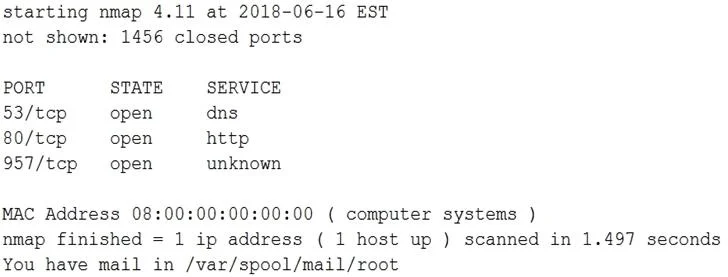
Options
- AAllow SFTP connections on port 22 using /etc/sysconfig/iptables.
- BAllow SFTP connections on port 20 and 21 using /etc/sysconfig/iptables.
- CAllow SFTP connections on port 25 using /etc/sysconfig/iptables.
- DAllow SFTP connections on port 1456 using /etc/sysconfig/iptables.
How the community answered
(25 responses)- A88% (22)
- C8% (2)
- D4% (1)
Why each option
SFTP (SSH File Transfer Protocol) operates over SSH on TCP port 22, not the FTP ports 20/21. Allowing port 22 in iptables restores SFTP connectivity.
SFTP is a subsystem of OpenSSH and uses TCP port 22 for all communications. Blocking port 22 in iptables prevents SSH and SFTP connections; adding a rule to allow port 22 in /etc/sysconfig/iptables restores access for all users.
Ports 20 and 21 are used by FTP (File Transfer Protocol), not SFTP; opening these ports would not restore SFTP connectivity.
Port 25 is reserved for SMTP (Simple Mail Transfer Protocol) and has no relation to SFTP or any file transfer service.
Port 1456 is not a standard or assigned port for SFTP; opening it would not allow connections to the SSH/SFTP daemon.
Concept tested: SFTP protocol port and iptables firewall rule
Source: https://www.openssh.com/manual.html
Topics
Community Discussion
No community discussion yet for this question.