
XDR-ENGINEER · Question #37
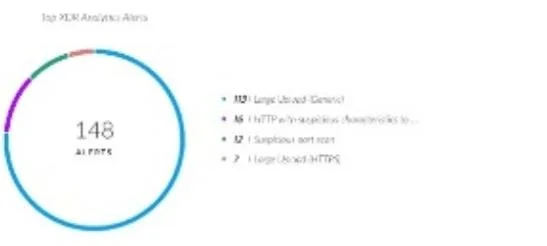
An engineer is building a dashboard to visualize the number of alerts from various sources. One of the widgets from the dashboard is shown in the image below: The engineer wants to configure a…
Sign in or unlock XDR-ENGINEER to reveal the answer and full explanation for question #37. The question stem and answer options stay visible for context.
Question
An engineer is building a dashboard to visualize the number of alerts from various sources. One of the widgets from the dashboard is shown in the image below:
The engineer wants to configure a drilldown on this widget to allow dashboard users to select any of the alert names and view those alerts with additional relevant details. The engineer has configured the following XQL query to meet the requirement:
dataset = alerts | fields alert_name, description, alert_source, severity, original_tags, alert_id, incident_id | filter alert_name = | sort desc _time How will the engineer complete the third line of the query (filter alert_name =) to allow dynamic filtering on a selected alert name?
Exhibit
Options
- A$y_axis.value
- B$x_axis.value
- C$x_axis.name
- D$y_axis.name
Unlock XDR-ENGINEER to see the answer
You've previewed enough free XDR-ENGINEER questions. Unlock XDR-ENGINEER for full answers, explanations, the timed quiz mode, progress tracking, and the master PDF. Question stem and options stay visible so you can still see what's on the exam.