
Veeam
VMCE_V12 · Question #52
A backup administrator must enable guest file system indexing for a backup job of a Microsoft Windows file server VM. All required credentials are added to the Veeam Backup & Replication server…
Sign in or unlock VMCE_V12 to reveal the answer and full explanation for question #52. The question stem and answer options stay visible for context.
Backup Job Configuration and Guest Processing
Question
A backup administrator must enable guest file system indexing for a backup job of a Microsoft Windows file server VM. All required credentials are added to the Veeam Backup & Replication server. VMware Tools (VIX) cannot be used due to security regulations. What should be done to make it possible in the following environment?
Exhibit
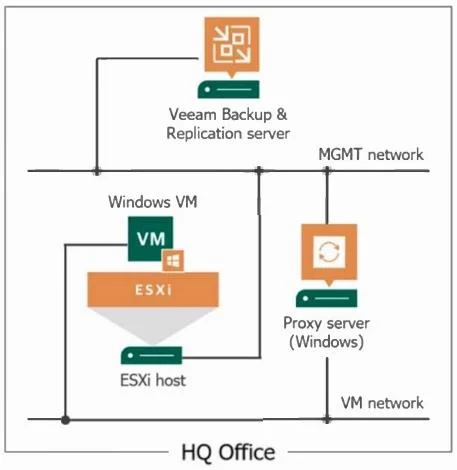
Options
- AUse the proxy server as a guest interaction proxy
- BConnect the ESXi host to the VM network
- CUse the Veeam Backup & Replication server as a quest interaction proxy
- DInstall a file system indexing plugin on the Microsoft Windows file server
Unlock VMCE_V12 to see the answer
You've previewed enough free VMCE_V12 questions. Unlock VMCE_V12 for full answers, explanations, the timed quiz mode, progress tracking, and the master PDF. Question stem and options stay visible so you can still see what's on the exam.
Topics
#guest file system indexing#guest interaction proxy#VIX alternative#Windows VM