
Broadcom-VMware
VCP550D · Question #191
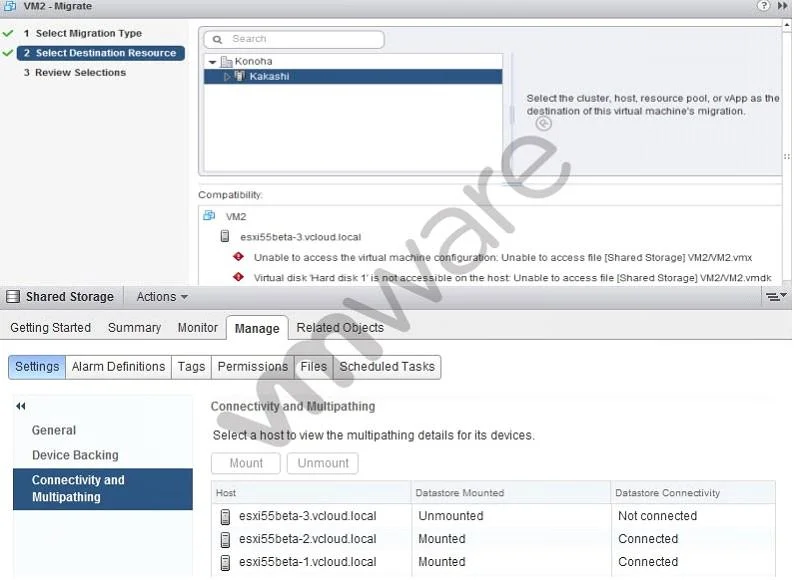
A vSphere administrator attempts to manually vMotion a virtual machine but receives error messages related to the Shared Storage datastore shown in the exhibit. The administrator uses the vSphere…
Sign in or unlock VCP550D to reveal the answer and full explanation for question #191. The question stem and answer options stay visible for context.
Question
A vSphere administrator attempts to manually vMotion a virtual machine but receives error messages related to the Shared Storage datastore shown in the exhibit. The administrator uses the vSphere Web Client and locates the datastore settings shown:
Which action should the administrator take to resolve these errors?
Exhibit
Options
- AReconnect server3 to the vCenter server.
- BSelect server3 and click Mount.
- CRemove server3 from the cluster then re-add it.
- DRight-click Not connected and select Connect.
Unlock VCP550D to see the answer
You've previewed enough free VCP550D questions. Unlock VCP550D for full answers, explanations, the timed quiz mode, progress tracking, and the master PDF. Question stem and options stay visible so you can still see what's on the exam.