
Broadcom-VMware
VCP510 · Question #601
An administrator determines that traffic shaping does not appear to be working on Production, a virtual machine port group on vSwitch1. Traffic shaping is working on all other port groups on the…
Sign in or unlock VCP510 to reveal the answer and full explanation for question #601. The question stem and answer options stay visible for context.
Question
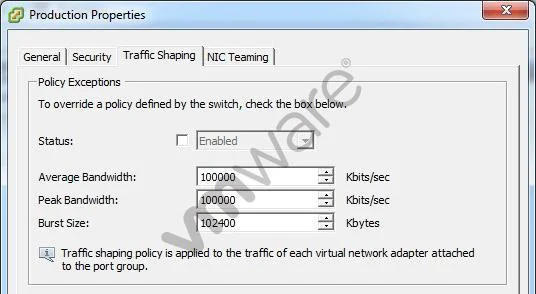
An administrator determines that traffic shaping does not appear to be working on Production, a virtual machine port group on vSwitch1. Traffic shaping is working on all other port groups on the switch. The administrator examines the Traffic Shaping settings as shown in the exhibit:
What should the administrator do to resolve the problem?
Exhibit
Options
- ASelect the Status checkbox to enable Traffic Shaping on the portgroup.
- BReduce the Average Bandwidth to 50% of the Peak Bandwidth.
- CReduce the Burst Size to 50% of the Peak Bandwidth.
- DClick the Security tab and create the necessary security exception.
Unlock VCP510 to see the answer
You've previewed enough free VCP510 questions. Unlock VCP510 for full answers, explanations, the timed quiz mode, progress tracking, and the master PDF. Question stem and options stay visible so you can still see what's on the exam.