
Broadcom-VMware
VCP510 · Question #46
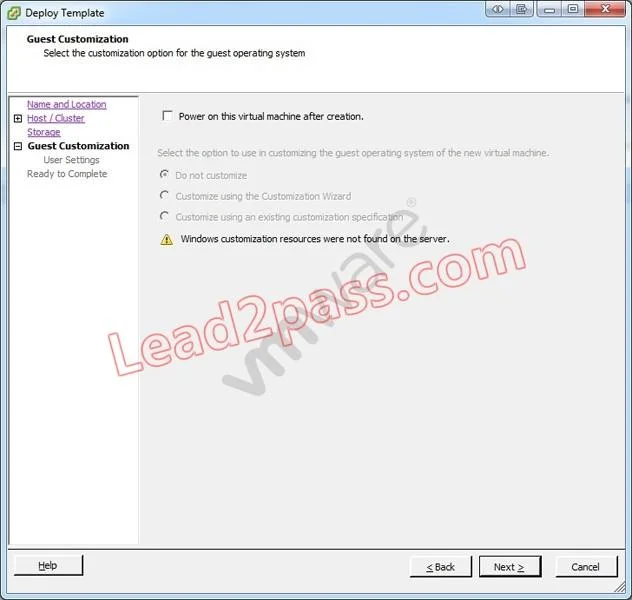
Click the Exhibit button. An administrator has implemented a new vSphere 5 environment and is deploying their first Windows 2008 R2 template. When running the Deploy Template wizard, the error shown…
The correct answer is A. Select the correct guest OS setting for the virtual machine. Windows Server 2008 R2 System Preparation tools are built into the Windows Server 2008 R2 operating system and do not have to be downloaded.
Administer Virtual Machines
Question
Click the Exhibit button. An administrator has implemented a new vSphere 5 environment and is deploying their first Windows 2008 R2 template. When running the Deploy Template wizard, the error shown in the exhibit appears. What can be done to correct the problem?
Exhibit
Options
- ASelect the correct guest OS setting for the virtual machine.
- BWindows 2003 x64 cannot be customized.
- CDownload and install the Microsoft Sysprep tool into the virtual machine to be customized.
- DDownload the Microsoft Sysprep tool to the appropriate vCenter Server directory.
How the community answered
(30 responses)- A70% (21)
- B3% (1)
- C10% (3)
- D17% (5)
Explanation
Windows Server 2008 R2 System Preparation tools are built into the Windows Server 2008 R2 operating system and do not have to be downloaded.
Topics
#template deployment#guest OS customization#Sysprep#Windows 2008 R2
Community Discussion
No community discussion yet for this question.