
VCP510 · Question #328
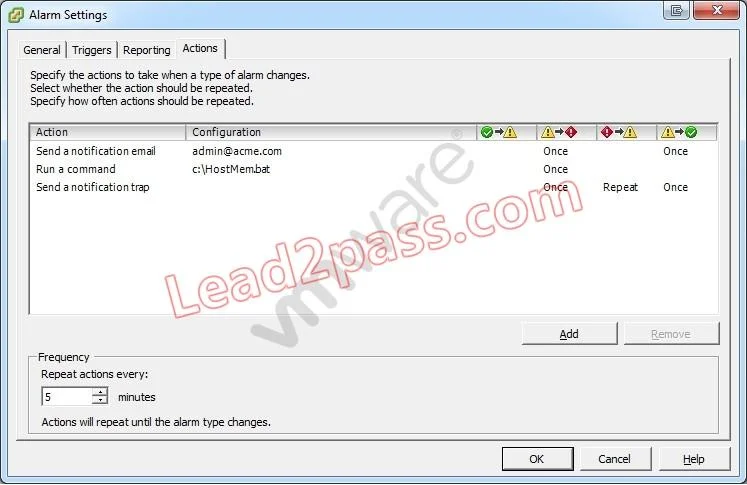
Click the Exhibit button. An administrator is seeing a warning on one of their hosts. The warning in the Triggered Alarms panel appears to come from a custom configured host alarm. The administrator…
The correct answer is C. Add an action for when the alarm changes from green to yellow. vcenter/index.jsp?topic=/com.vmware.vsphere.dcadmin.doc_41/vc_client_help/working_with_alar ms/c_working_with_alarms.html
Question
Click the Exhibit button. An administrator is seeing a warning on one of their hosts. The warning in the Triggered Alarms panel appears to come from a custom configured host alarm. The administrator has not seen any actions taken for this alarm even though the actions are configured in the alarm definition. The configured actions are shown in the exhibit. What change can the administrator make to correct the problem?
Exhibit
Options
- AConfigure the Alarm Frequency to repeat more often.
- BAdd an action for when the alarm changes from yellow to red.
- CAdd an action for when the alarm changes from green to yellow.
- DConfigure the alarm yellow to red action to repeat for all three actions configured.
How the community answered
(48 responses)- A2% (1)
- B8% (4)
- C83% (40)
- D6% (3)
Explanation
vcenter/index.jsp?topic=/com.vmware.vsphere.dcadmin.doc_41/vc_client_help/working_with_alar ms/c_working_with_alarms.html
Topics
Community Discussion
No community discussion yet for this question.