
VCP5-DCV · Question #328
Click the Exhibit button. An administrator is seeing a warning on one of their hosts. The warning in the Triggered Alarms panel appears to come from a custom configured host alarm. The administrator…
Sign in or unlock VCP5-DCV to reveal the answer and full explanation for question #328. The question stem and answer options stay visible for context.
Question
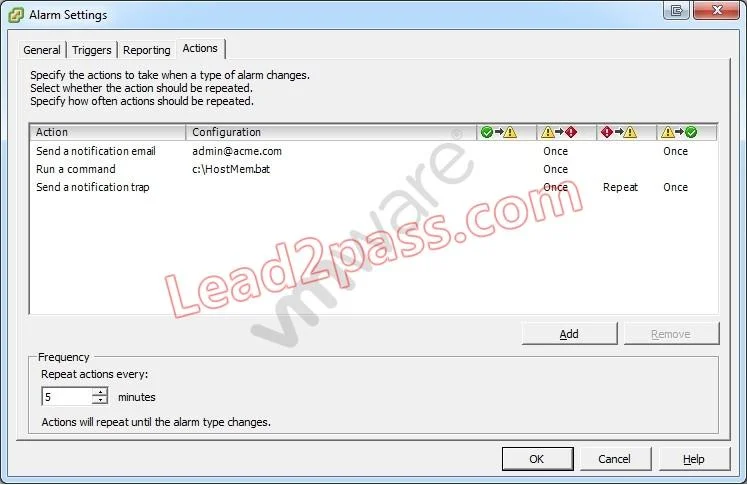
Click the Exhibit button. An administrator is seeing a warning on one of their hosts. The warning in the Triggered Alarms panel appears to come from a custom configured host alarm. The administrator has not seen any actions taken for this alarm even though the actions are configured in the alarm definition. The configured actions are shown in the exhibit. What change can the administrator make to correct the problem?
Exhibit
Options
- AConfigure the Alarm Frequency to repeat more often.
- BAdd an action for when the alarm changes from yellow to red.
- CAdd an action for when the alarm changes from green to yellow.
- DConfigure the alarm yellow to red action to repeat for all three actions configured.
Unlock VCP5-DCV to see the answer
You've previewed enough free VCP5-DCV questions. Unlock VCP5-DCV for full answers, explanations, the timed quiz mode, progress tracking, and the master PDF. Question stem and options stay visible so you can still see what's on the exam.