
VCP5-DCV · Question #287
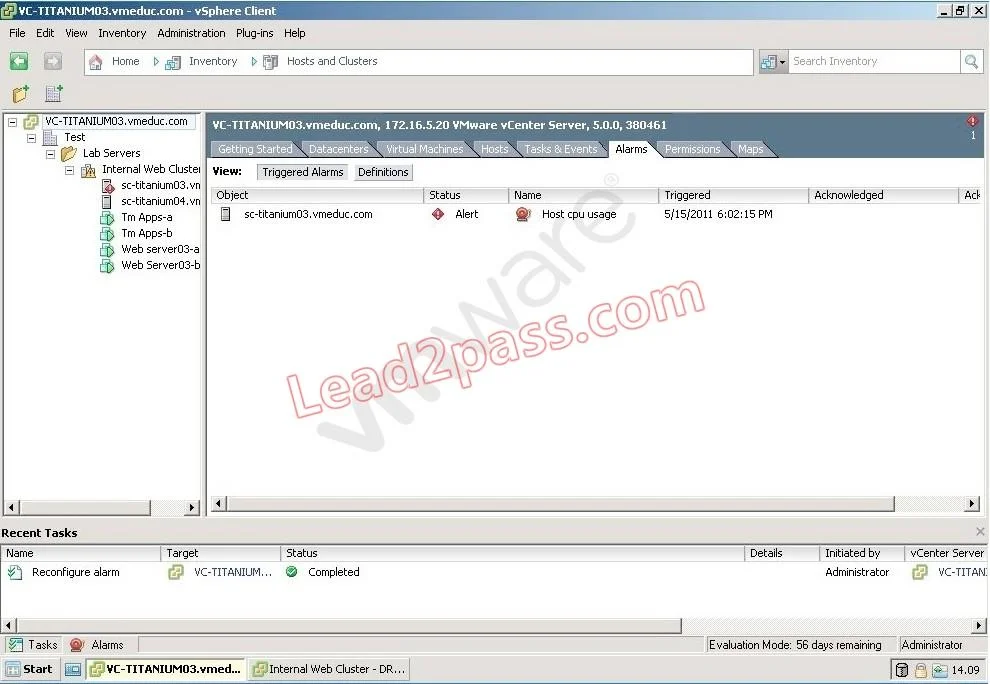
Click the Exhibit button. Users are having difficulty accessing a Web server since a new Web application was configured in a virtual machine running on sc-titanium03.vmeduc.com. The web server has…
Sign in or unlock VCP5-DCV to reveal the answer and full explanation for question #287. The question stem and answer options stay visible for context.
Question
Click the Exhibit button. Users are having difficulty accessing a Web server since a new Web application was configured in a virtual machine running on sc-titanium03.vmeduc.com. The web server has been assigned 1 vCPU. The vSphere Client reports the error shown in the exhibit. DRS is set to fully automated mode, but the problem has not resolved. Which action can resolve the issue?
Exhibit
Options
- ASet a CPU reservation for the web server VM.
- BManually move the Virtual Machine using high priority vMotion.
- CConfigure the DRS Migration Threshold to Aggressive.
- DSet CPU affinity for the virtual machine.
Unlock VCP5-DCV to see the answer
You've previewed enough free VCP5-DCV questions. Unlock VCP5-DCV for full answers, explanations, the timed quiz mode, progress tracking, and the master PDF. Question stem and options stay visible so you can still see what's on the exam.