
VAULT-ASSOCIATE-002 · Question #93
You need to edit a policy, but the UI appears as shown. What is the problem?
The correct answer is B. You don't have a permission to manage policies. The inability to edit a policy through the Vault UI usually indicates that the user's current token lacks the necessary permissions to perform policy management operations.
Question
Exhibit
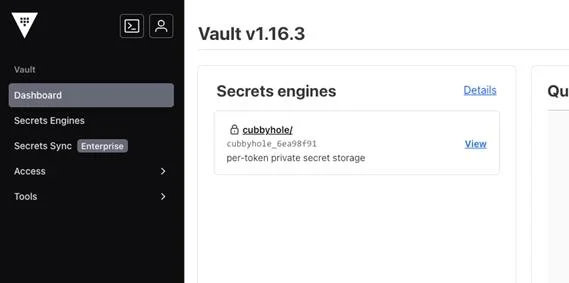
Options
- AThis is an UI error. Contact support.
- BYou don't have a permission to manage policies.
- CVault UI does not support policy creation and management.
- DUse the command shell in UI to manage policies.
How the community answered
(37 responses)- B95% (35)
- C3% (1)
- D3% (1)
Why each option
The inability to edit a policy through the Vault UI usually indicates that the user's current token lacks the necessary permissions to perform policy management operations.
While UI errors can occur, a restricted view for policy management is a common symptom of insufficient permissions due to Vault's security model, not necessarily a bug.
If the Vault UI prevents a user from editing policies, it is because the token used by that user does not have the required capabilities (e.g., `update` or `sudo`) on the `sys/policies/acl` path. Vault's access control is policy-driven, and all UI actions are subject to these defined policies.
The Vault UI does support policy creation and management, provided the authenticated user has appropriate administrative permissions.
While the command shell in the UI can be used for policy management, the primary issue preventing UI-based editing is usually insufficient permissions, not a fundamental limitation requiring CLI use.
Concept tested: Vault policy management permissions
Source: https://developer.hashicorp.com/vault/docs/concepts/policies#capabilities
Topics
Community Discussion
No community discussion yet for this question.