
VAULT-ASSOCIATE-002 · Question #16
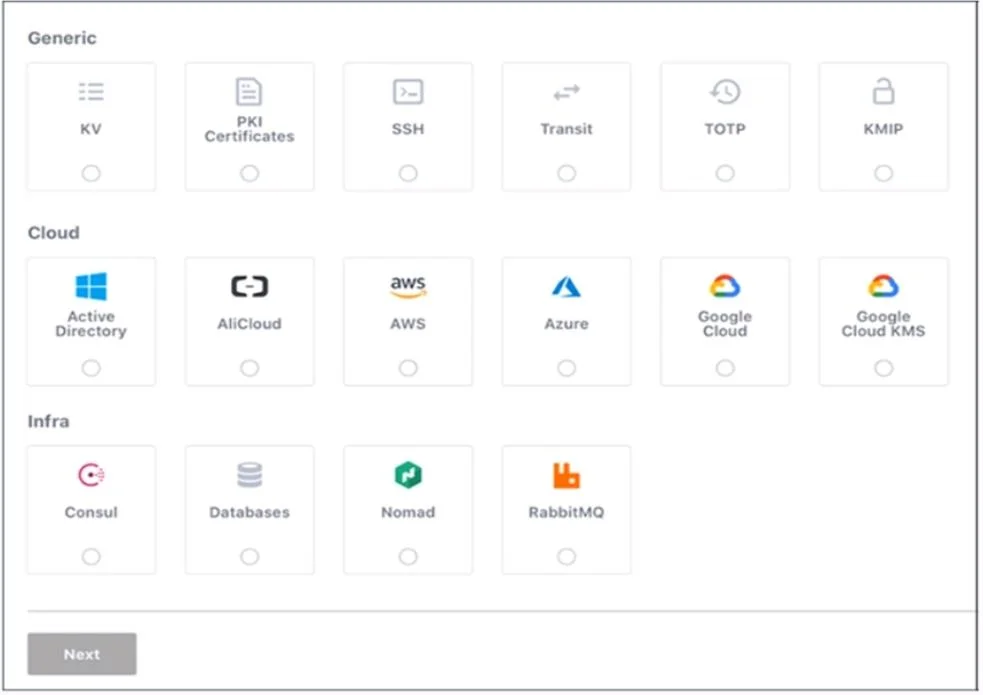
Use this screenshot to answer the question below: When are you shown these options in the GUI?
The correct answer is C. Enabling secret engines. The provided options, showing various engine types like kv, pki, or aws with an "Enable" action, are presented when configuring secret engines in the Vault GUI.
Question
Exhibit
Options
- AEnabling policies
- BEnabling authentication engines
- CEnabling secret engines
- DEnabling authentication methods
How the community answered
(30 responses)- A3% (1)
- B7% (2)
- C87% (26)
- D3% (1)
Why each option
The provided options, showing various engine types like `kv`, `pki`, or `aws` with an "Enable" action, are presented when configuring secret engines in the Vault GUI.
Enabling policies involves defining access control rules, not selecting from a list of engine types.
Enabling authentication engines involves choosing methods like 'userpass', 'LDAP', or 'AppRole', which are distinct from secret engine types.
The Vault GUI presents a list of available engine types (e.g., `kv`, `pki`, `aws`) when you navigate to the section for enabling new secret engines, allowing users to choose which type of secret backend to activate.
This is a duplicate of B, and refers to authentication methods (e.g., AppRole, AWS), not secret engines.
Concept tested: Vault GUI, secret engine management
Source: https://developer.hashicorp.com/vault/docs/secrets/kv
Topics
Community Discussion
No community discussion yet for this question.