
TDS-C01 · Question #30
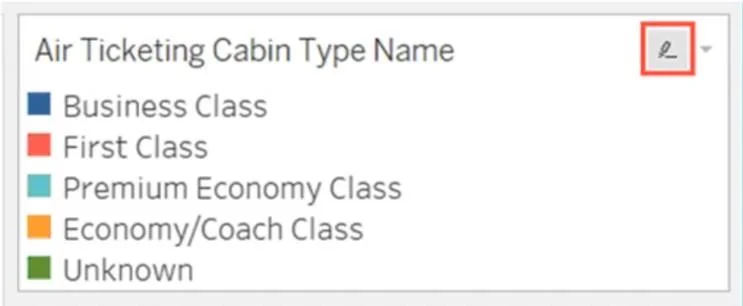
You have the following legend. What occurs when you click the icon to the right of Air Ticketing Cabin Type Name?
The correct answer is B. The highlighter toggles on or off. The icon to the right of Air Ticketing Cabin Type Name in the legend is the highlighter icon. When clicked, it toggles the highlighter on or off, allowing you to highlight specific values in the view based on the legend items. This feature helps emphasize certain categories…
Question
You have the following legend. What occurs when you click the icon to the right of Air Ticketing Cabin Type Name?
Exhibit
Options
- AThe legend toggles on or off
- BThe highlighter toggles on or off
- CThe filter options open
- DThe Edit Colors dialog box opens
How the community answered
(42 responses)- A2% (1)
- B88% (37)
- C7% (3)
- D2% (1)
Explanation
The icon to the right of Air Ticketing Cabin Type Name in the legend is the highlighter icon. When clicked, it toggles the highlighter on or off, allowing you to highlight specific values in the view based on the legend items. This feature helps emphasize certain categories without filtering them out. The other options-such as toggling the legend, opening filter options, or accessing the Edit Colors dialog box-are not associated with this icon.
Topics
Community Discussion
No community discussion yet for this question.