
TDS-C01 · Question #131
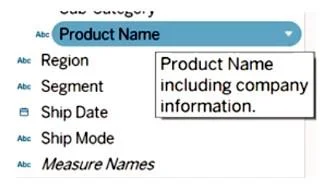
You want to provide additional information when hovering over a field in the Data pane as shown in the following exhibit. What should you configure for the field?
The correct answer is C. A default comment. Configuring a default comment adds descriptive tooltip text that appears when a user hovers over a field in the Data pane - exactly what the exhibit shows. In Tableau, you set this by right-clicking a field, choosing Default Properties > Comment, and typing your description…
Question
You want to provide additional information when hovering over a field in the Data pane as shown in the following exhibit. What should you configure for the field?
Exhibits
Options
- AAn alias
- BA header label
- CA default comment
- DA hierarchy
How the community answered
(51 responses)- A2% (1)
- B2% (1)
- C92% (47)
- D4% (2)
Explanation
Configuring a default comment adds descriptive tooltip text that appears when a user hovers over a field in the Data pane - exactly what the exhibit shows. In Tableau, you set this by right-clicking a field, choosing Default Properties > Comment, and typing your description.
Why the distractors are wrong:
- A (Alias): An alias renames a field's values (e.g., "1" → "Male") - it doesn't add hover text to the Data pane.
- B (Header label): Header labels control text displayed in view headers (rows/columns on the canvas), not Data pane tooltips.
- D (Hierarchy): A hierarchy groups related fields for drill-down navigation (e.g., Year > Quarter > Month) - no tooltip functionality involved.
Memory tip: Think of a default comment like a code comment - it's a hidden note about a field that only appears when you look closer (hover), not something visible in the finished view.
Topics
Community Discussion
No community discussion yet for this question.