
SY0-701 · Question #45
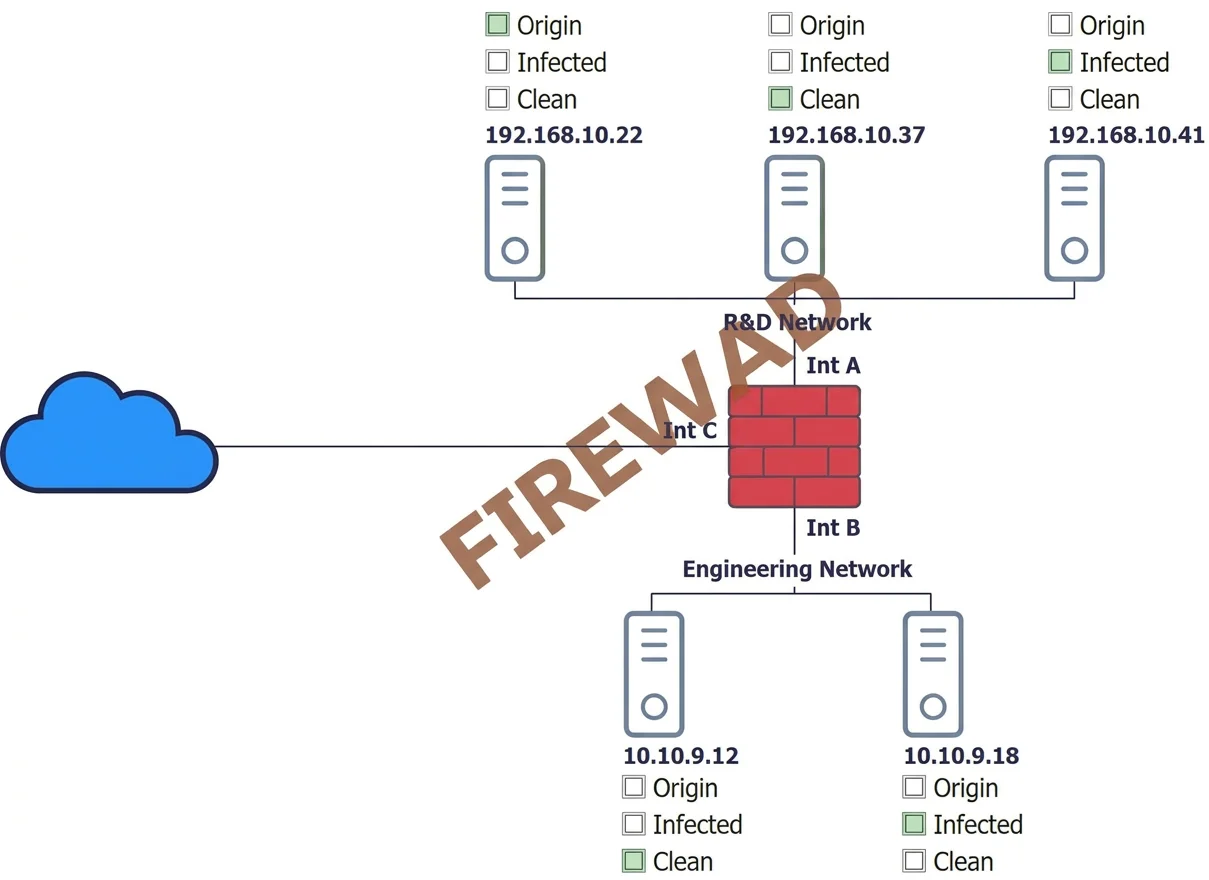
Hotspot Question You are a security administrator investigating a potential infection on a network. INSTRUCTIONS Click on each host and firewall. Review all logs to determine which host originated…
The correct answer is 192.168.10.22: Infected. The correct approach involves analyzing host logs to identify malware activity and remediation status, correlating with firewall logs for outbound communication and spread, to determine the infection origin and current status of each host.
Question
Exhibits
Answer Area
- 192.168.10.22InfectedCleanInfected
Explanation
The correct approach involves analyzing host logs to identify malware activity and remediation status, correlating with firewall logs for outbound communication and spread, to determine the infection origin and current status of each host.
Approach. The task is to identify the host that originated the infection and classify the other hosts as clean or infected. This requires careful log analysis and correlation:
-
Identify the Originator (192.168.10.22):
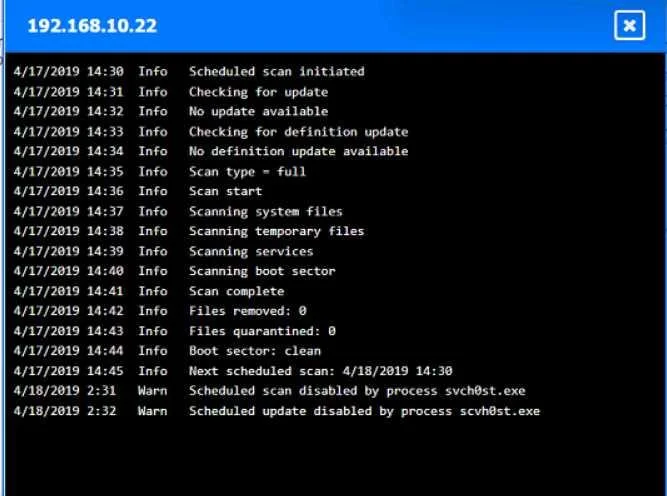
- Reviewing the log for 192.168.10.22 shows 'Warn: Scheduled scan disabled by process svch0st.exe' at 4/18/2019 2:31 and 'Warn: Scheduled update disabled by process svch0st.exe' at 4/18/2019 2:32. The typo 'svch0st.exe' (with a zero) is a strong indicator of malware. Disabling security features is a common malicious behavior.
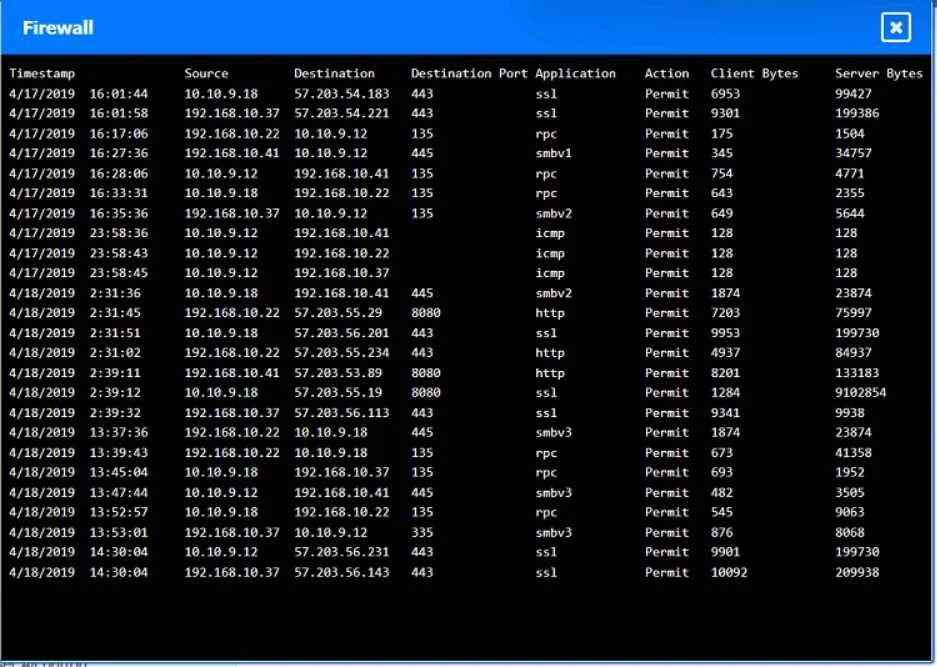
- Correlating with the Firewall log, at or immediately after 4/18/2019 2:31, 192.168.10.22 initiates multiple outbound connections to various external IPs (e.g., 57.203.55.29, 57.203.56.201, 57.203.55.234) on ports 8080 (http) and 443 (ssl). This indicates Command and Control (C2) communication. This combination of earliest self-modification (disabling AV) and outbound C2 traffic makes 192.168.10.22 the most likely originator.
- Interaction: Click on the representation of '192.168.10.22' and label it as 'Originator'.
-
Identify Remaining Infected Host (192.168.10.41):
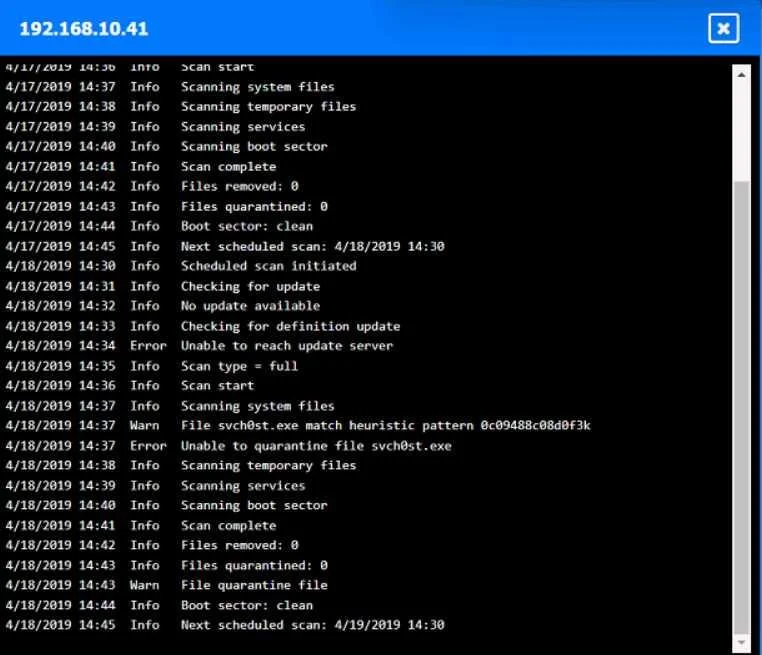
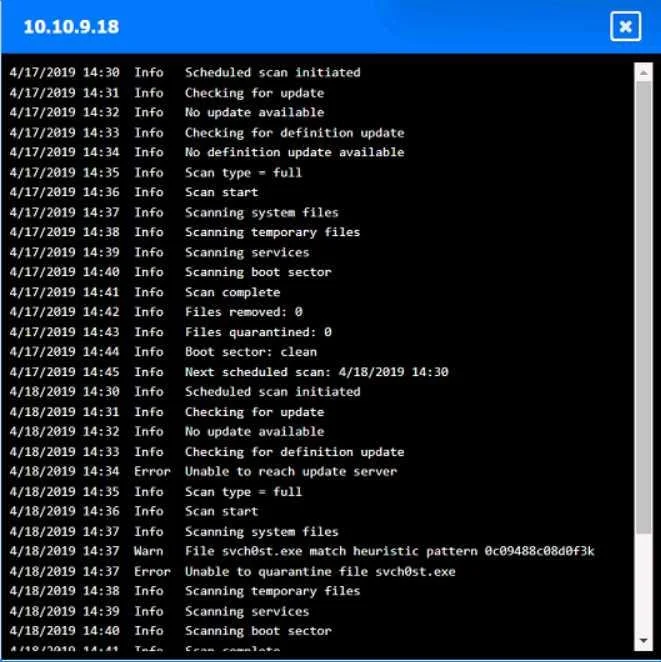
- The log for 192.168.10.41 shows 'Warn: File found svch0st.exe match heuristic pattern...' at 4/18/2019 14:37, followed by 'Error: Unable to quarantine file svch0st.exe' at 4/18/2019 14:38. This clearly indicates the malware was detected but could not be removed, meaning the host is still infected.
- The firewall log also shows 192.168.10.41 communicating outbound to 57.203.53.89 on port 8080 at 4/18 2:39:11, further confirming its infection.
- Interaction: Click on the representation of '192.168.10.41' and label it as 'Infected'.
-
Identify Clean Hosts (192.168.10.37 and 10.10.9.12):
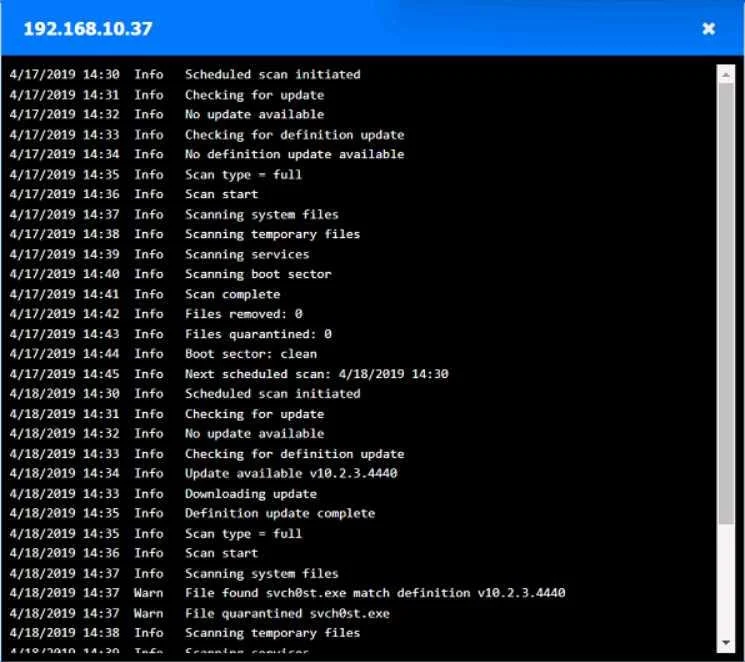
- The log for 192.168.10.37 shows 'Warn: File found svch0st.exe match definition...' at 4/18/2019 14:36 and 'Warn: File quarantined svch0st.exe' at 4/18/2019 14:37. This means the antivirus successfully remediated the threat.
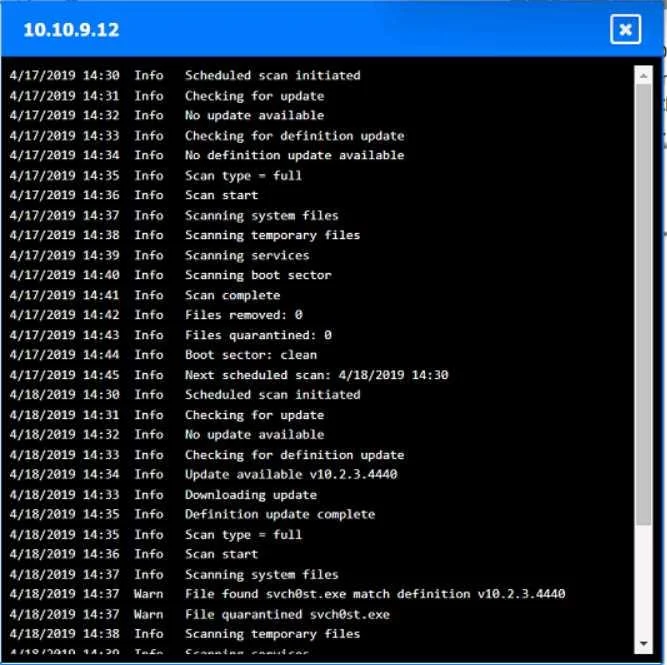
- The log for 10.10.9.12 shows identical entries: 'Warn: File found svch0st.exe match definition...' at 4/18/2019 14:36 and 'Warn: File quarantined svch0st.exe' at 4/18/2019 14:37, indicating successful remediation.
- Interaction: Click on the representation of '192.168.10.37' and '10.10.9.12' and label them as 'Clean'.
Common mistakes.
- common_mistake. Common mistakes include:
- Misinterpreting 'svch0st.exe': Overlooking the '0' (zero) in
svch0st.exeand assuming it's the legitimatesvchost.exeprocess, thus missing the clear indication of malware. - Ignoring timestamps: Not correlating events across different logs (host vs. firewall) by their timestamps. Forgetting to look for the earliest active malicious behavior (like disabling AV) rather than just the earliest detection time.
- Misclassifying quarantined hosts: Assuming a host where malware was 'quarantined' is still infected. Quarantine typically implies successful containment and removal from active execution, rendering the host 'clean' or 'remediated' at that point.
- Not identifying remediation failure: Failing to notice the 'Unable to quarantine' error, which means a detected threat is still active and the host remains infected.
- Focusing only on inbound connections: Not analyzing outbound connections in the firewall logs, which are crucial for identifying C2 communication or internal spread attempts by malware.
Concept tested. This question primarily tests incident response skills, specifically:
- Log Analysis: Interpreting system and network firewall logs to identify malicious activities.
- Malware Analysis & Behavior: Recognizing common malware characteristics such as process name spoofing (svch0st.exe), disabling security features, and initiating Command and Control (C2) communications.
- Incident Timeline Reconstruction: Correlating events across multiple sources by timestamp to establish the sequence of an infection.
- Host Status Assessment: Differentiating between actively infected, remediated (clean), and initial compromise (originator) statuses based on log evidence.
- Network Forensics: Using firewall logs to track the spread and communication of malware.
Topics
Community Discussion
No community discussion yet for this question.