
SPLK-5001 · Question #19
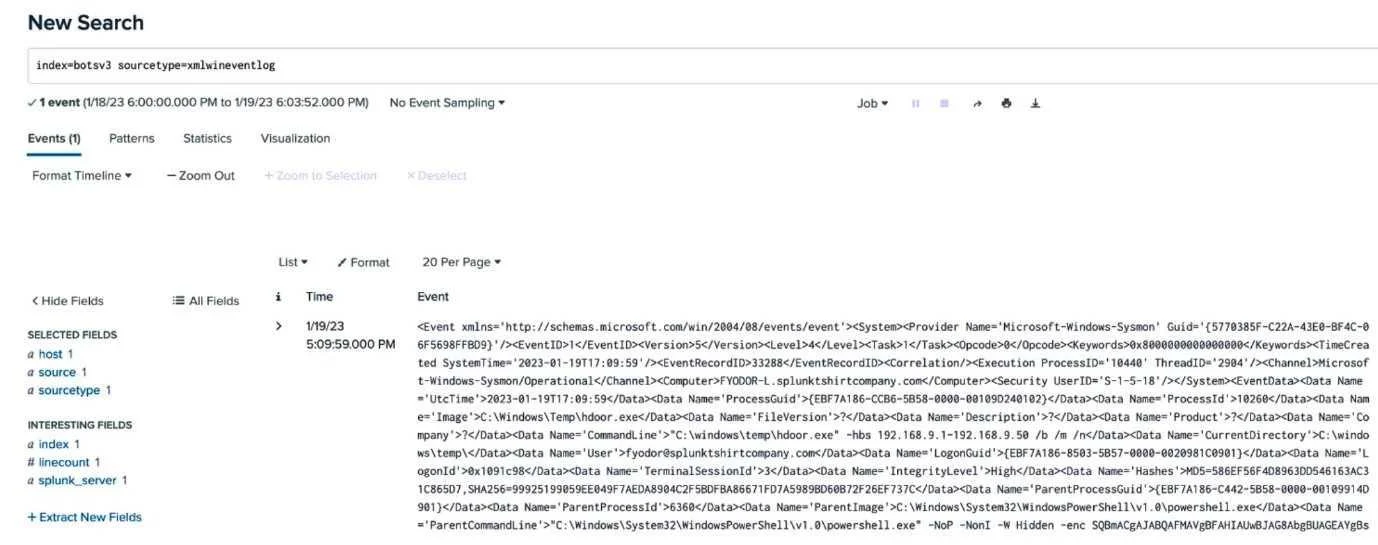
An analyst is building a search to examine Windows XML Event Logs, but the initial search is not returning any extracted fields. Based on the above image, what is the most likely cause?
The correct answer is C. The analyst did not add the excract command to their search pipeline. Option C is correct because Windows XML Event Logs store data in a structured XML format that Splunk does not automatically parse into individual fields - the analyst must explicitly include the extract (or spath) command in the search pipeline to pull out key-value pairs from…
Question
An analyst is building a search to examine Windows XML Event Logs, but the initial search is not returning any extracted fields. Based on the above image, what is the most likely cause?
Exhibit
Options
- AThe analyst does not have the proper role to search this data.
- BThe analyst is searching newly indexed data that was improperly parsed.
- CThe analyst did not add the excract command to their search pipeline.
- DThe analyst is not in the Drooer Search Mode and should switch to Smart or Verbose.
How the community answered
(16 responses)- A6% (1)
- B6% (1)
- C75% (12)
- D13% (2)
Explanation
Option C is correct because Windows XML Event Logs store data in a structured XML format that Splunk does not automatically parse into individual fields - the analyst must explicitly include the extract (or spath) command in the search pipeline to pull out key-value pairs from the raw XML. Without this command, the data is indexed as raw text and no named fields are surfaced.
Why the distractors are wrong:
- A is wrong because role/permission issues would prevent the search from running at all, not merely prevent field extraction.
- B is wrong because improperly parsed data is a stretch - the data can be indexed fine; the problem is that extraction hasn't been applied at search time.
- D is wrong because "Drooer Search Mode" is not a real Splunk mode (Splunk has Fast, Smart, and Verbose); while Fast Mode limits field discovery, the root cause here is the missing extract command, not the search mode.
Memory tip: Think of XML Event Logs as a sealed envelope - Splunk can store the envelope (index it), but you need the extract/spath command to open it and read the fields inside. No extract = no fields.
Topics
Community Discussion
No community discussion yet for this question.