
SPLK-1003 · Question #212
A Splunk index has the following configuration: Assume hot buckets only roll based on size. What is the correct bucket life cycle for the data?
The correct answer is B. Hot > Warm > Cold > Delete. The standard Splunk bucket lifecycle is Hot > Warm > Cold > Frozen. When data ages out of cold storage and no coldToFrozenDir or coldToFrozenScript is configured in indexes.conf, Splunk deletes the data - making the effective lifecycle Hot > Warm > Cold > Delete (option B)…
Question
A Splunk index has the following configuration:
Assume hot buckets only roll based on size. What is the correct bucket life cycle for the data?
Exhibit
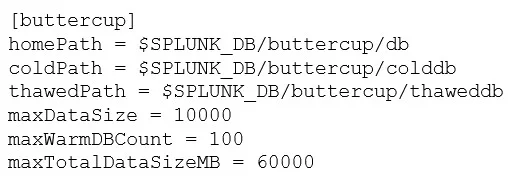
Options
- AHot > Warm > Delete
- BHot > Warm > Cold > Delete
- CHot > Warm > Archive
- DHot > Warm > Cold > Archive
How the community answered
(21 responses)- B86% (18)
- C5% (1)
- D10% (2)
Explanation
The standard Splunk bucket lifecycle is Hot > Warm > Cold > Frozen. When data ages out of cold storage and no coldToFrozenDir or coldToFrozenScript is configured in indexes.conf, Splunk deletes the data - making the effective lifecycle Hot > Warm > Cold > Delete (option B). Option D (archive) would be correct only if a frozen archive destination were configured. Since the question states to assume hot buckets roll on size only and does not mention a frozen archive setting, deletion is the outcome when cold buckets age out.
Topics
Community Discussion
No community discussion yet for this question.