
SPLK-1003 · Question #145
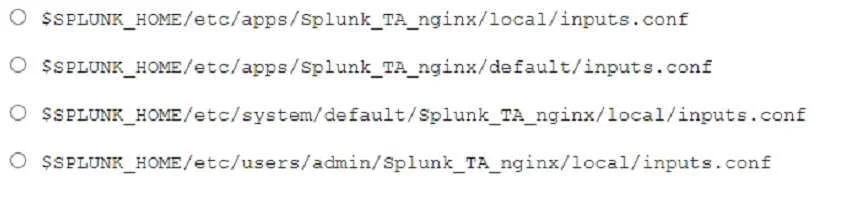
A user recently installed an application to index NCINX access logs. After configuring the application, they realize that no data is being ingested. Which configuration file do they need to edit to…
The correct answer is A. Option A. In Splunk, app configuration files in the 'default/' directory are managed by the app vendor and get overwritten on upgrade. To make custom changes that persist through upgrades, edits must be made in the 'local/' directory of the app (e.g…
Question
A user recently installed an application to index NCINX access logs. After configuring the application, they realize that no data is being ingested. Which configuration file do they need to edit to ingest the access logs to ensure it remains unaffected after upgrade?
Exhibit
Options
- AOption A
- BOption B
- COption C
- DOption D
How the community answered
(43 responses)- A74% (32)
- B14% (6)
- C5% (2)
- D7% (3)
Explanation
In Splunk, app configuration files in the 'default/' directory are managed by the app vendor and get overwritten on upgrade. To make custom changes that persist through upgrades, edits must be made in the 'local/' directory of the app (e.g., $SPLUNK_HOME/etc/apps/<app_name>/local/inputs.conf). The 'local/' directory is never overwritten during upgrades. Since no data is being ingested, the inputs.conf file needs a monitor or file input stanza pointing to the NGINX access log path, and placing it in local/ ensures it survives future app updates.
Topics
Community Discussion
No community discussion yet for this question.